Smart home hubs can simplify device control, but many take up valuable shelf or counter space. The best compact options combine practical connectivity with easy setup, reliable automation, and support for the platforms you already use.
This roundup compares 10 space-saving smart home hubs, bridges, and control devices for apartments, smaller rooms, and streamlined smart-home systems.
Best 10 Space-Saving Smart Home Hubs Picks for 2026
Best Multi-Protocol Hub

- Supports Matter, Z-Wave Plus, Zigbee, Wi-Fi, and SmartThings
- Works with Alexa and Google Home
- Offers Wi-Fi or Ethernet connectivity
Best For: Multi-brand homes needing broad protocol support
Best Mini Smart Plug

- Compact plug-in design for tight spaces
- Supports schedules, timers, and remote control
- Works with Alexa and Google Assistant
Best For: Individual lamps and appliances in small spaces
Best Wall-Mounted Control Panel

- 8-inch customizable smart home dashboard
- Built-in Wi-Fi, Zigbee, Matter, Thread, and more
- Supports wall mounting near an outlet
Best For: Families wanting shared visual Alexa control
Best Long-Range Sensor Hub

- Listed maximum range of up to 2,034 feet
- Compact wired plug-in design
- Supports smartphone and voice control
Best For: Extended-range YoLink setups without battery backup
Compact Tapo Control

- Supports up to 64 sensors or buttons plus four cameras or doorbells
- Built-in smart alarm and chime functionality
- Optional microSD storage up to 512GB
Best For: Tapo households wanting a compact hub with alerts and local storage
Cross-Platform Bridge
SONOFF Bridge-M Smart Home Hub
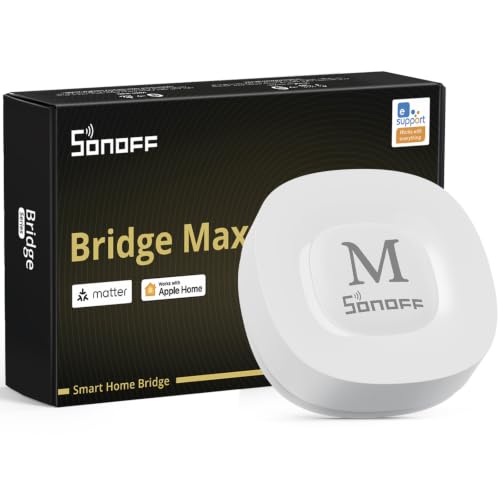
- Bridges Zigbee, BTHome, and eWeLink devices to Matter platforms
- Local web console works without relying on cloud services
- Supports Home Assistant, Ethernet, Wi-Fi, and third-party Zigbee devices
Best For: Mixed smart homes needing local control and Matter interoperability
Mini Zigbee Gateway
THIRDREALITY Smart Hub Gen2 Plus

- Smaller than a deck of cards with convenient USB-A power
- Supports up to 32 devices and a 50-meter open-space range
- Includes remote control, groups, timers, and schedules
Best For: THIRDREALITY users wanting a tiny Zigbee hub for simple automation
Best Connected Hub

- Supports up to 128 Aqara Zigbee devices
- Adds IR control for TVs, fans, and AC units
- Works with Ethernet, USB power, and major assistants
Best For: Aqara-based automation and security systems
Best for Flic Controls

- Compact hub for Flic Buttons and Flic Twists
- Offers up to 50 meters of communication range
- Designed for sub-0.1-second response times
Best For: Button- and dial-based smart home control
Best Battery-Powered Gateway

- Connects compatible Bluetooth and Zigbee devices
- Enables remote app and voice control
- Compact battery-powered design for flexible placement
Best For: Fingerbot and compatible Bluetooth or Zigbee accessories
Best Multi-Protocol Hub – Aeotec Smart Home Hub
The Aeotec Smart Home Hub is a strong choice for space-saving smart home hubs when you want one compact control point for devices using Matter, Z-Wave Plus, Zigbee, Wi-Fi, and SmartThings. It supports both Wi-Fi and Ethernet, and the SmartThings app handles setup, control, and automation.
Best For: Homes that need broad device compatibility and customizable SmartThings routines.
Pros:
- Supports Matter, SmartThings, Z-Wave Plus, Zigbee, and Wi-Fi devices.
- Works with Amazon Alexa and Google Home.
- Offers Wi-Fi or wired Ethernet setup.
- Many automations can run locally for improved speed and reliability.
Cons:
- Z-Wave Plus compatibility is specified for the V3 model.
- Designed for use in North America.
This is the most flexible option here for building a multi-brand smart home while keeping control in one hub and app. Its protocol support makes it especially useful if your device collection spans several ecosystems.
Best Mini Smart Plug – Kasa EP10 Smart Plug
The Kasa EP10 is not a central hub, but its ultra-mini design makes it a practical space-saving smart home hubs companion for adding simple control to individual appliances. It connects over 2.4GHz Wi-Fi and can be managed through the Kasa app or by voice.
Best For: Renters and small spaces that need compact control for lamps, fans, humidifiers, or other appliances.
Pros:
- Compact 2.36 x 2.03 x 1.5-inch plug-in design.
- Supports scheduling, countdown timers, and remote control.
- Works with Amazon Alexa and Google Assistant.
- Rated for up to 15 amps and 1,800 watts.
Cons:
- Requires a 2.4GHz Wi-Fi connection.
- Controls individual plugged-in devices rather than serving as a multi-protocol hub.
Choose the EP10 when your priority is adding smart control without taking much outlet space. It is a straightforward accessory for a Wi-Fi-based setup, rather than a replacement for a full smart home hub.
Best Wall-Mounted Control Panel – Amazon Echo Hub
The Amazon Echo Hub combines an 8-inch customizable touchscreen with a built-in smart home hub, making it a useful space-saving smart home hubs option for households that want visible, at-a-glance control. Its dashboard can organize devices, cameras, routines, and security controls in one location.
Best For: Families that want a shared wall-mounted control panel for Alexa-compatible devices and routines.
Pros:
- Customizable dashboard with resizable sections.
- Built-in support for Wi-Fi, Bluetooth, Zigbee, Matter, Sidewalk, and Thread devices.
- Can be wall mounted near an outlet.
- Controls compatible cameras, locks, alarms, sensors, media, and routines.
Cons:
- Wall-mount cable pass-through and power-over-Ethernet accessories are sold separately.
- Tabletop stand is sold separately.
- Alexa+ and compatible Ring features require the applicable subscription.
The Echo Hub is a good fit when convenience means having a dedicated control screen rather than relying only on a phone or voice commands. Its built-in connectivity and configurable layout help reduce scattered controls around the home.
Best Long-Range Sensor Hub – YoLink YS1603 Smart Home Hub
The YoLink YS1603 is a compact wired hub for smartphone and voice-based control, with a listed maximum range of up to 2,034 feet. Its simple plug-in format makes it worth considering among space-saving smart home hubs for homes that prioritize long-range connectivity.
Best For: Users who need a small, wired hub with extended range for compatible YoLink devices and motion alerts.
Pros:
- Compact 4.33 x 4.33 x 1.06-inch footprint.
- Listed maximum range of up to 2,034 feet.
- Supports smartphone and voice-based control.
- Uses a simple wired, plug-in connection.
Cons:
- Supplied details list wired connectivity rather than Wi-Fi.
- Regular version does not include battery backup.
- Compatibility details are limited in the supplied specifications.
The YS1603 stands out for its stated range and uncomplicated plug-in setup. It is best evaluated as a focused YoLink hub for extended coverage, especially where battery backup is not required.
Compact Tapo Control – Tapo H200 Smart Hub
The Tapo H200 is a practical choice for anyone building space-saving smart home hubs around Tapo sensors, buttons, cameras, and a video doorbell. Its compact 2.81-inch footprint adds device coordination, alarm and chime functions, and optional local video storage without requiring a large central unit.
Best For: Tapo users who want a compact hub with built-in alerts and expandable local storage.
Pros:
- Supports up to 64 switches, sensors, or buttons plus four cameras or doorbells.
- Acts as a smart alarm or chime for compatible cameras, doorbells, and sensors.
- Supports microSD video storage up to 512GB, with the card sold separately.
- Low-power wireless connectivity can help compatible sensors and buttons last longer.
Cons:
- Requires a 2.4GHz Wi-Fi network.
- Local storage requires a separately purchased microSD card.
- Its strongest compatibility is within the Tapo device ecosystem.
Choose the H200 if you already use Tapo products and want a small hub that combines device management, audible alerts, and optional camera storage. Alexa and Google Home support adds convenient voice control.
Cross-Platform Bridge – SONOFF Bridge-M Smart Home Hub
The SONOFF Bridge-M is one of the more flexible space-saving smart home hubs for mixed ecosystems. It bridges Zigbee, BTHome, and eWeLink devices to Matter platforms while offering Wi-Fi, Ethernet, local management, and Home Assistant integration.
Best For: Advanced users combining Zigbee devices with Matter platforms, Home Assistant, or local automations.
Pros:
- Bridges Zigbee, BTHome, and eWeLink devices to Alexa, Google Home, and Apple Home.
- Provides a local web console without requiring cloud services for configuration.
- Supports Home Assistant through MQTT and can connect compatible third-party Zigbee devices.
- Includes a 90dB alarm and mobile notifications when paired with suitable Zigbee sensors.
Cons:
- It is a Matter Bridge, not a Matter Controller, so it cannot add Matter devices directly.
- Its broader feature set may require more setup than a single-brand hub.
- Some functions depend on compatible Zigbee sensors or connected ecosystems.
The Bridge-M stands out when interoperability and local control matter more than simplicity. Its compact design and Ethernet option make it a strong fit for a technically minded smart home with devices from several platforms.
Mini Zigbee Gateway – THIRDREALITY Smart Hub Gen2 Plus
The THIRDREALITY Smart Hub Gen2 Plus is a very small Zigbee gateway for users who want space-saving smart home hubs without giving up basic scheduling and group controls. Its USB-A connector lets you power it directly from a compatible USB-A port, while 2.4GHz Wi-Fi connects it to the network.
Best For: THIRDREALITY users who want a tiny, straightforward Zigbee gateway for up to 32 devices.
Pros:
- Mini design is smaller than a deck of cards and measures 3.25 by 1.7 by 0.5 inches.
- USB-A power makes it easy to place near compatible USB-A ports without a separate charging cable.
- Supports up to 32 connected devices with an open-space range of up to 50 meters.
- Offers remote control, groups, countdown timers, and scheduled smart-home actions.
Cons:
- Only supports 2.4GHz Wi-Fi.
- Designed to work with THIRDREALITY Zigbee devices rather than serving as a broad multi-brand hub.
- Requires the THIRDREALITY app for setup and feature management.
This hub is a good fit when physical space and simple placement are priorities. Its small footprint and USB-A power are especially convenient, though buyers should confirm that their devices are compatible with the THIRDREALITY ecosystem.
Best Connected Hub – Aqara Smart Hub M2
The Aqara Smart Hub M2 is a strong choice for space-saving smart home hubs when you want one compact bridge for Aqara Zigbee devices, alarms, automations, and IR-controlled appliances. Its wired Ethernet option can help provide a stable connection, while USB power allows flexible placement.
Best For: Aqara households building a centralized automation and security system with HomeKit, Alexa, Google Assistant, or IFTTT support.
Pros:
- Supports up to 128 Aqara Zigbee devices when compatible repeaters are used.
- Built-in 360-degree IR control for TVs, fans, and air conditioners.
- Offers Ethernet connectivity, USB power, and broad platform compatibility.
- Built-in speaker supports alerts, doorbells, alarms, and configurable ringtones.
Cons:
- Requires a 2.4 GHz Wi-Fi network.
- Works with Aqara Zigbee child devices, not Aqara Thread devices or third-party Zigbee devices.
- Compatibility varies by sub-device and platform.
The M2 packs several hub functions into a small surface-mounted unit, making it especially practical for an Aqara-focused setup. Check individual device compatibility before expanding beyond the core ecosystem.
Best for Flic Controls – Flic Hub Mini
The Flic Hub Mini is a particularly compact option among space-saving smart home hubs, designed to connect Flic Buttons or Flic Twists with compatible smart home devices. It provides long-range communication and fast response without taking up much room.
Best For: Flic users who want button- or dial-based control for compatible Matter, Alexa, SmartThings, Philips Hue, Nanoleaf, and Govee devices.
Pros:
- Small design helps conserve space around a home automation setup.
- Supports communication distances up to 50 meters, or 150 feet.
- Promises latency below 0.1 seconds for responsive control.
- Can help Flic Controllers operate for more than two years on a single charge.
Cons:
- Requires a Flic Button or Flic Twist, sold separately.
- Its primary supported controller is a Flic device rather than a general-purpose hub interface.
The Hub Mini makes sense when physical, programmable controls are central to your setup. It is less suitable as a standalone hub because it requires a compatible Flic Controller to function.
Best Battery-Powered Gateway – HomeHub Smart Gateway
The HomeHub Smart Gateway is a small, battery-powered choice among space-saving smart home hubs for connecting compatible Bluetooth and Zigbee devices. It adds remote app access, voice control, and cloud-based scheduling where supported.
Best For: Users connecting compatible Bluetooth or Zigbee accessories, including Fingerbot devices, to remote controls and voice assistants.
Pros:
- Combines Bluetooth and Zigbee connectivity in one compact gateway.
- Enables remote control through the internet with supported devices.
- Supports Alexa, Google Assistant, and Siri voice control.
- Battery is included, and the unit measures about 2.72 by 0.98 by 2.68 inches.
Cons:
- Remote features depend on supported devices and cloud services.
- Cloud scheduling may not be available for every connected device.
- Compatibility details are device-dependent.
This gateway offers a tidy way to bring Bluetooth and Zigbee accessories into one system, particularly for Fingerbot upgrades. Verify device support if you need specific app, voice, or cloud functions.
How We Picked the Best Space-Saving Smart Home Hubs
We focused on compact devices that add meaningful control without requiring a full-size control panel or bulky networking setup. The selections cover several use cases, including multi-protocol hubs, Zigbee and Z-Wave gateways, Matter-compatible controllers, smart-plug-based control, security accessories, and touchscreen interfaces.
We also considered platform compatibility, wireless requirements, app functionality, voice-assistant support, expandability, and the amount of space each device typically needs. Because compatibility can vary by region, firmware, and device model, check the manufacturer’s current supported-device list before buying.
Quick Comparison
| Best For | Look For | Notable Consideration |
|---|---|---|
| Broad device compatibility | Matter plus Zigbee or Z-Wave | More protocols can improve flexibility |
| Simple voice control | Alexa or Google Assistant support | Some features may require a compatible ecosystem |
| Security and sensors | Zigbee, proprietary accessories, or alarm support | Confirm sensor compatibility before expanding |
| Visual control | Touchscreen dashboard | Requires more wall or counter space than a mini hub |
| Lowest space demand | Mini bridge or compact gateway | May support fewer protocols or devices |
Key Buying Factors for Space-Saving Smart Home Hubs
Protocol Support
Matter can make newer devices easier to share across ecosystems, while Zigbee and Z-Wave remain useful for sensors, switches, locks, and other low-power products. A hub that supports multiple standards can reduce the number of separate bridges in your home.
Platform Compatibility
Check whether the hub works with your preferred voice assistant and smart-home platform. Compatibility with Alexa, Google Assistant, SmartThings, Apple Home, Philips Hue, or other systems may differ by device category and feature.
Network and Power Requirements
Many compact hubs require 2.4GHz Wi-Fi, an Ethernet connection, or a nearby USB power source. Confirm that your router supports the required band and that the hub can be placed where its wireless signal will remain reliable.
Size Versus Control
Mini gateways save the most space, but they may rely heavily on an app or another controller. Touchscreen hubs offer faster local control but need a more visible installation area. Choose based on how often you want hands-on access.
Expansion and Reliability
Review supported device limits, automation features, cloud dependencies, firmware support, and backup behavior. A slightly larger hub may be a better long-term value if it prevents the need for additional bridges later.
Who Should Buy Which Space-Saving Smart Home Hubs?
Choose a multi-protocol hub if you want one central controller for a mixed collection of devices. A compact Zigbee gateway is a sensible choice for lights, sensors, and switches within one compatible ecosystem. Shoppers who want a visible dashboard should consider a touchscreen control hub, while users building around a specific brand may get the smoothest experience from that brand’s dedicated bridge.
For a small apartment, bedroom, office, or rental, prioritize a compact footprint, dependable Wi-Fi, and compatibility with the devices you already own. If you are starting from scratch, select the hub with the broadest practical protocol support rather than choosing solely by size. The best Space-Saving Smart Home Hubs make future expansion easier while keeping your setup uncluttered.