From creative tools and desk upgrades to home entertainment and useful everyday tech, these gifts suit a range of interests and routines. Consider what the recipient already owns and how they might use a new device.
12 Tech Gifts to Consider
1. BLUETTI Elite 30 V2 Portable Power Station
Portable Backup for Outings
BLUETTI Elite 30 V2 Portable Power Station

- 288Wh capacity and 600W continuous output support small devices and camping gear.
- Use AC, solar, or car charging among its eight charging modes.
- A 10ms UPS switch supports connected devices during power interruptions.
Best For: Campers, road-trippers, or someone who wants backup power for small devices.
2. Anker Prime 14-in-1 Laptop Docking Station
A More Connected Laptop Desk
Anker Prime 14-in-1 Laptop Docking Station

- Brings together 14 connections, including USB-C, USB-A, and dual HDMI ports.
- Offers up to 160W total output and data transfer speeds up to 10Gbps.
- Supports USB-C, USB4, and Thunderbolt; check laptop display support and OS compatibility.
Best For: A laptop user looking to connect peripherals and external displays at a desk.
3. XPPen Artist 13.3 Pro V2 Drawing Tablet
A Screen for Digital Sketching
XPPen Artist 13.3 Pro V2 Drawing Tablet

- The 13.3-inch display is fully laminated and supports up to 60-degree stylus tilt.
- A red dial and eight customizable shortcut keys support common drawing actions.
- Requires a computer or laptop; the listed software support includes Photoshop, Illustrator, SAI, and Blender.
Best For: An illustrator, art student, or hobby artist who wants to draw on a display.
4. VONKO Robot Vacuum and Mop with LiDAR
Less Hands-On Floor Care
VONKO Robot Vacuum and Mop with LiDAR

- Combines vacuuming and mopping for hard floors and vacuuming for carpets.
- LiDAR mapping supports saved maps for up to five floors and app-set no-go zones.
- The self-emptying station is described as providing up to 60 days between emptying.
Best For: Someone seeking app-managed help with everyday floor cleaning.
5. Pastigio Frameo 15.6-Inch Digital Picture Frame
A Shared Display for Family Photos
Pastigio Frameo 15.6-Inch Digital Picture Frame

- The 15.6-inch FHD touchscreen can receive photos and videos through the Frameo app over Wi-Fi.
- Includes 32GB of built-in memory and supports up to 32GB of external storage.
- Photos can also be transferred by full-size SD card, USB drive, or Windows computer.
Best For: Family members who enjoy displaying and sharing photos.
6. Aurzen Roku TV D1R Portable Projector
Big-Screen Movie Nights
Aurzen Roku TV D1R Portable Projector

- Projects a 1080p image, with a stated screen size range of 60 to 150 inches.
- Roku provides access to popular streaming apps; activation requires an account and internet connection.
- Auto focus and auto keystone correction help align the projected image.
Best For: Movie fans who want a larger-screen setup at home or outdoors.
7. Tenda Nova MX12 AX3000 Wi-Fi 6 Mesh System
A Whole-Home Connection Upgrade
Tenda Nova MX12 AX3000 Wi-Fi 6 Mesh System

- The three-pack is listed for coverage up to 7,000 square feet and more than 160 devices.
- Wi-Fi 6 mesh supports roaming between units across a home network.
- It replaces a router setup; the MX series cannot form a mesh with the MW series.
Best For: Someone dealing with home Wi-Fi dead zones or many connected devices.
8. Amazfit Bip Max Smart Watch
Activity and GPS for the Wrist

- Includes built-in GPS, offline maps, and more than 150 sports modes.
- The Zepp app lists training, nutrition, and recovery features without a subscription.
- The maker states up to 20 days of typical battery life.
Best For: A fitness-minded recipient interested in routes, workouts, and activity metrics.
9. Portable Bluetooth Speaker with 20W HD Sound
Music for Home and Outings
Portable Bluetooth Speaker with 20W HD Sound
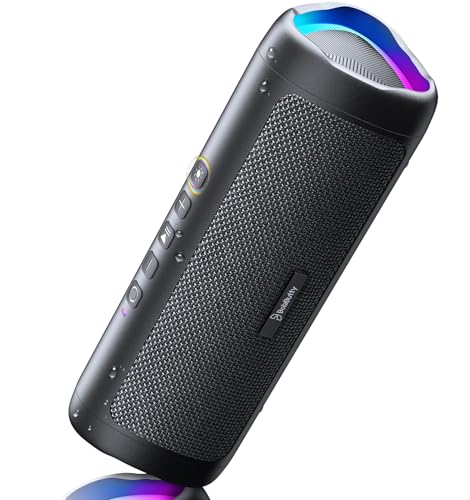
- Bluetooth 5.3 connects to devices, with a stated wireless range up to 100 feet.
- IPX5 water resistance is intended for splashes and spills around outdoor gatherings.
- Up to 24 hours of playtime is listed at 50% volume with lights off.
Best For: Someone who enjoys music at home, outdoors, or while traveling.
10. FIFINE AmpliGame A6V USB Gaming Microphone
A Desktop Mic for Voice Chat
FIFINE AmpliGame A6V USB Gaming Microphone

- USB plug-and-play setup supports PS4, PS5, desktop, and laptop use.
- A tap-to-mute button, gain knob, and RGB lighting are built in.
- The package includes a tripod stand, shock mount, pop filter, and USB cable.
Best For: A gamer, streamer, or remote caller who needs a desktop microphone.
11. GETPALS 3-in-1 Wireless Charging Station
A Shared Charging Spot
GETPALS 3-in-1 Wireless Charging Station
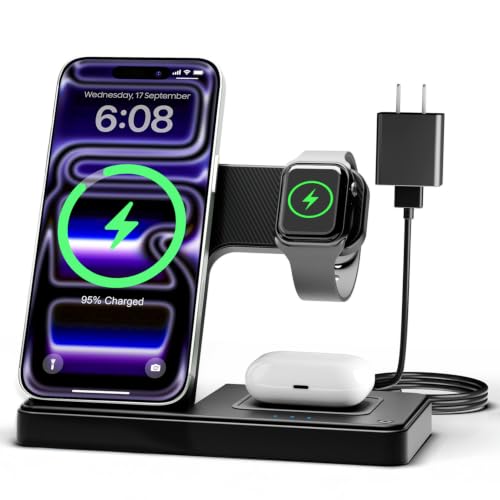
- Designed to charge compatible iPhones, Apple Watch models, and AirPods with wireless charging cases.
- The foldable design suits a bedside table, desk, or travel bag.
- Case compatibility is listed up to 4mm; avoid cases with metal rings, pockets, or magnets.
Best For: Someone with several compatible Apple devices who wants a tidier charging spot.
12. SanDisk Extreme 2TB Portable SSD
Portable Space for Important Files
SanDisk Extreme 2TB Portable SSD

- Provides 2TB of portable storage with USB connectivity.
- The listed performance is up to 1,050MB/s read and 1,000MB/s write, depending on the host device and other factors.
- IP65 water and dust resistance and up to 3-meter drop protection are listed.
Best For: A photographer, student, or professional who needs portable file storage.
Choosing a Tech Gift for This Recipient
Start with a routine the recipient already has. A device that fits how they work, create, travel, or relax is more likely to be useful than a novelty chosen only for its feature list. For a laptop-based work or study setup, the Anker dock can bring peripherals and supported displays together, while the FIFINE microphone suits voice chat, streaming, and calls. A digital artist may appreciate the XPPen drawing display, but remember it needs a connected computer or laptop.
For home and family life, consider whether they would enjoy a digital photo frame, a projector for shared viewing, or a robot vacuum that can handle routine floor care. The projector needs an internet connection and Roku account for activation, so it fits someone comfortable with streaming services. The Frameo display has app-based Wi-Fi sharing as well as transfer options using storage media or a Windows computer. For a recipient who spends time outdoors, a portable speaker or power station may be more useful than another desk accessory.
Choose a Budget That Matches the Need
Tech gifts vary widely in cost, so decide first whether you want a small accessory or a larger household upgrade. The speaker, microphone, charging station, and SSD solve more specific everyday needs. A docking station or smartwatch can make a noticeable personal setup addition. The mesh system, drawing display, projector, robot vacuum, and portable power station are broader purchases with more setup or space considerations.
Avoid relying on a headline feature alone. Capacity, screen size, coverage, or runtime is most meaningful when it addresses a real use. A large storage drive may be valuable to someone who moves video or photo files, while it may be unnecessary for someone whose files already live in cloud storage. Similarly, mesh Wi-Fi is a sensible idea when the recipient has coverage gaps or many devices, but less so in a small home with reliable connectivity.
Check Compatibility and Personal Preferences
Before choosing a tech Christmas gift, confirm what devices the recipient already uses. The charging station is designed for compatible Apple devices, and AirPods require a wireless charging case. The Anker dock requires a laptop that supports the relevant USB-C display and power features; its external display behavior differs on macOS, and it does not support Linux. For the projector, consider where it will be used, whether there is a suitable power outlet, and whether the recipient has access to the streaming services they want.
Personalization can make a practical gift feel considered. Choose around a hobby, workspace, or shared family habit: drawing tools for someone who sketches, portable storage for someone managing large files, or a photo frame for relatives who exchange pictures. Think about setup comfort, too. A gadget with an app, account, or connection requirements is a better fit for someone willing to configure it. For a less technical recipient, simpler controls or transfer methods may matter more than advanced options.
Plan Timing and Last-Minute Decisions
For a gift that needs setup, leave time to check device compatibility, update software, and place it where it will be used. A mesh system may involve replacing or reconfiguring home networking equipment; a projector needs a viewing space; a tablet or dock needs the right computer connection. If you are shopping close to Christmas, choose from the recipient’s known devices and routines rather than guessing at an unfamiliar ecosystem.
A practical last-minute choice can still feel personal when paired with a clear reason: extra storage for a photographer, a microphone for a friend who streams, or a shared frame for a family member. Consider how the item will fit into their home and whether it needs companion devices, an app, or an account. Those quick checks can help make a useful present feel thoughtful and ready to enjoy.