The best budget smart home control panels make everyday automation easier by putting lights, scenes, sensors, and compatible devices within quick reach. The right panel can reduce app-hopping while adding a more convenient wall-mounted control point.
This roundup compares 10 affordable options, from simple touchscreen switches and dimmer kits to Zigbee hubs, alarm-system upgrades, and larger Home Assistant displays. Use the buying guide below to match features, wiring, ecosystem support, and installation requirements to your home.
Best 10 Budget Smart Home Control Panels Picks for 2026
Scene Control Pick
SONOFF NSPanel Smart Control Center
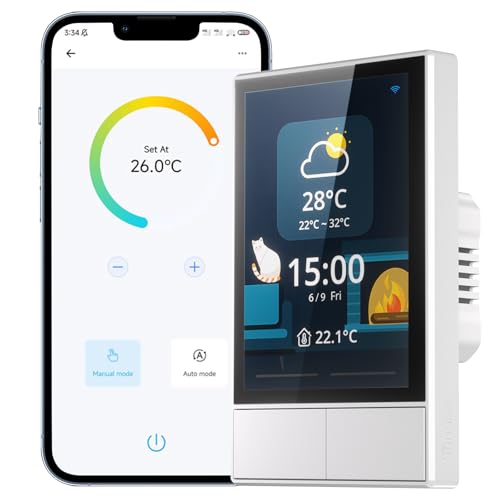
- Dual-channel touchscreen wall control
- Built-in temperature and thermostat functions
- Supports Alexa, Google Assistant, and SONOFF devices
Best For: SONOFF users wanting scenes and climate control in one panel
Reliable Lighting Kit
Lutron Caseta Deluxe Starter Kit

- Two smart dimmers and Pico remotes included
- Hub works without Wi-Fi
- No neutral wire required
Best For: Reliable smart lighting with app, remote, and voice control
Simple Touch Panel

- Direct 2.4GHz Wi-Fi connection
- Smart Life scheduling and family sharing
- Tempered-glass touchscreen design
Best For: Basic one-way light or appliance control on a budget
Security Retrofit Value

- Converts wired alarms to smart control
- Supports 12 sensor zones
- No required battery or monthly subscription
Best For: DIY upgrades of existing wired alarm systems
Best Value DIY Panel
TONGOU 3-Switch WiFi Control Panel

- 3.5-inch panel with three physical switches
- Tuya, Smart Life, Alexa, and Google Assistant support
- Neutral wire and 2.4GHz Wi-Fi required
Best For: DIY switch replacement with centralized device control
Best Built-In Voice Hub

- 5-inch touchscreen with built-in Alexa
- Integrated Zigbee gateway
- Wired or wireless networking options
Best For: Smart Life homes needing voice and Zigbee control
Best Large-Screen Option
Fabater 8-Inch Smart Home Panel
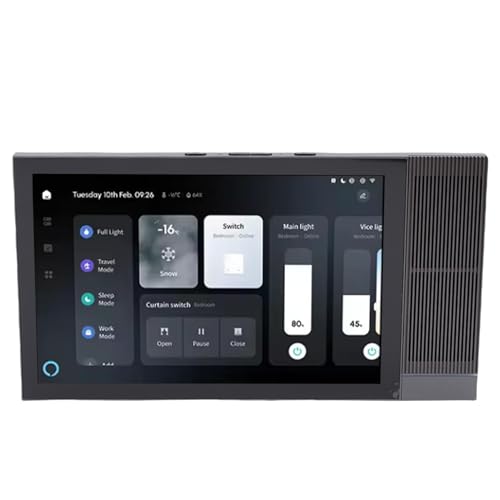
- 8-inch 1280×800 touchscreen
- Voice control for Tuya devices
- Dual 2W speakers with 2GB RAM and 16GB ROM
Best For: Wall-mounted Tuya control with a larger interface and audio
Best All-in-One Display

- 4.7-inch touchscreen for multiple home functions
- Supports security alerts and camera viewing
- Tracks selected devices’ energy use
Best For: Centralized home monitoring and control
Best Versatile Budget Panel
3.5-Inch IR Smart Control Panel

- Controls over 200 devices and scenes
- Built-in IR covers 12 device categories
- Supports touch, buttons, voice, and app control
Best For: Mixed smart and infrared device setups
Best Tuya Wall Switch

- 4-inch touchscreen with three relay switches
- Controls Tuya-compatible lights and devices
- Supports custom scenes and app control
Best For: Tuya-based lighting and wall control
Scene Control Pick – SONOFF NSPanel Smart Control Center
For shoppers comparing budget smart home control panels, the SONOFF NSPanel stands out as a wall-mounted touchscreen that combines two switch channels, scene control, temperature functions, and app or voice operation. It is especially appealing if your home already uses SONOFF devices and the eWeLink app.
Best For: SONOFF users who want touchscreen scenes, grouped-device control, and basic thermostat functionality in one wall panel.
Pros:
- Combines dual-channel switching, touchscreen controls, scenes, and thermostat features.
- Works with Alexa, Google Assistant, Alice, and Siri Shortcuts.
- Displays time, date, weather, and indoor and outdoor temperature information.
- Can centrally control grouped SONOFF devices through the eWeLink app.
Cons:
- Requires a 2.4GHz Wi-Fi connection for pairing.
- Not compatible with SmartThings devices.
- Its broadest device-control benefits are centered on the SONOFF ecosystem.
The NSPanel offers more than a basic smart switch, making it a strong value for a SONOFF-based home. Confirm wiring, ecosystem compatibility, and the lack of SmartThings support before buying.
Reliable Lighting Kit – Lutron Caseta Deluxe Starter Kit
Among budget smart home control panels and control systems, the Lutron Caseta Deluxe Starter Kit is a practical choice for dependable smart lighting. It includes two dimmers, a hub, Pico remotes, and wall plates, while its hub is designed to keep working without Wi-Fi.
Best For: Households prioritizing reliable, app-controlled dimming with broad smart-home compatibility and no-neutral installation.
Pros:
- Includes two dimmers, two Pico remotes, a Smart Hub, and wall plates.
- Hub operation does not depend on Wi-Fi for fast, stable smart-lighting control.
- No neutral wire is required for installation.
- Supports scenes, schedules, geofencing, timers, and Smart Away through the Lutron app.
Cons:
- This is primarily a lighting-control system rather than a general touchscreen home panel.
- Separate installation and compatibility checks may still be needed for existing wiring and bulbs.
- Pico remotes use non-rechargeable batteries.
Caseta is a strong value when reliability and lighting control matter more than a built-in touchscreen. Its included hub and remotes make the kit a convenient starting point for expanding smart lights.
Simple Touch Panel – Wi-Fi Smart Touch Switch
WiFi Touch Screen Smart Switch and Home Control | 1-Way AC Panel with Remote App Control (White)
Check Price On AmazonThis Wi-Fi Touch Screen Smart Switch is a straightforward option for budget smart home control panels if you want a modern wall interface without a separate central hub. It connects to a 2.4GHz router and uses the Smart Life app for remote control, scheduling, timers, and shared access.
Best For: Budget-conscious users seeking one-way touch control for lights or appliances through Smart Life and compatible voice platforms.
Pros:
- Connects directly to a 2.4GHz router without a central control unit.
- Tempered-glass touch panel and flame-retardant ABS construction provide a modern design.
- Smart Life app supports schedules, timers, status updates, and family sharing.
- Supports remote, physical, and voice control with compatible platforms.
Cons:
- Designed for one-way switching rather than multi-location control.
- Requires Wi-Fi and the Smart Life app for connected features.
- Voice-platform wording and compatibility should be verified before installation.
This panel is best viewed as an affordable, single-location smart switch with a touchscreen aesthetic. It suits basic lighting or appliance control, but buyers needing multi-zone automation may want a more capable system.
Security Retrofit Value – Konnected Alarm Panel Pro
The Konnected Alarm Panel Pro is a specialized entry in the budget smart home control panels category, designed to modernize an existing wired alarm system. Its 12 zones, Wi-Fi and Ethernet connectivity, and direct support for wired sensors can add app and voice control without a required battery or monthly subscription.
Best For: DIY homeowners converting a compatible wired alarm system into a connected smart-home security setup.
Pros:
- Retrofits wired motion, door, window, leak, and siren or strobe devices.
- Offers 12 zones with Wi-Fi, Ethernet, and PoE connectivity.
- Works with SmartThings, Alexa, Home Assistant, Hubitat, and other platforms.
- Includes a power adapter, mounting hardware, labels, jumper wires, and a screwdriver.
Cons:
- It is intended for wired alarm-system conversion, not general lighting control.
- DIY installation requires working with existing alarm wiring.
- Smart features depend on setup with a compatible app or voice platform.
For the right existing alarm system, Konnected can be a cost-conscious way to gain remote monitoring and automation while avoiding a required subscription. Check your sensor wiring and preferred smart-home platform before committing.
Best Value DIY Panel – TONGOU 3-Switch WiFi Control Panel
If you want budget smart home control panels with built-in physical switches, the TONGOU DIY panel combines a 3.5-inch screen with three-button manual control. It works with Tuya or Smart Life devices, but installation requires a neutral wire and a compatible switch box.
Best For: DIYers who want to replace up to three switches while adding centralized Tuya or Smart Life control.
Pros:
- Controls up to three circuits manually and through the app.
- Supports scenes, device status, weather, time, and date on the screen.
- Works with Alexa and Google Assistant and supports compatible smart home devices.
Cons:
- Requires a neutral wire and 2.4GHz Wi-Fi for connection.
- May not fit every switch box, so compatibility should be checked first.
- Its IP20 rating is intended for indoor use.
The TONGOU is a practical budget choice when you need both switch replacement and a compact control interface. Confirm wiring, box dimensions, and load compatibility before ordering.
Best Built-In Voice Hub – MOES Smart Home Control Panel
Among budget smart home control panels, the MOES Smart Home Control Panel stands out for combining a 5-inch touchscreen, built-in Alexa, and a Zigbee gateway. It supports wired or wireless networking and can use either Type-C power or a circuit connection.
Best For: Smart Life users who want hands-free Alexa control and a Zigbee hub integrated into one wall panel.
Pros:
- Built-in Alexa enables hands-free control of devices, scenes, and voice skills.
- Integrated Zigbee gateway eliminates the need for a separate gateway.
- 5-inch full-touch display supports convenient device and scene control.
- Offers wired and wireless network options plus two power-supply modes.
Cons:
- Compatibility is centered on Smart Life devices.
- The supplied specifications provide limited information about dimensions and installation details.
The MOES is a strong fit if you want to consolidate voice control, touchscreen operation, and Zigbee connectivity. Its flexible networking and power options may also simplify installation planning.
Best Large-Screen Option – Fabater 8-Inch Smart Home Panel
For shoppers comparing budget smart home control panels with larger displays, the Fabater offers an 8-inch 1280×800 touchscreen, 2GB of RAM, and 16GB of storage. It is designed for Tuya devices and adds voice control, dual speakers, and wall-mounted installation.
Best For: Users who want a room-friendly wall panel with a larger interface, hands-free commands, and built-in audio.
Pros:
- Large 8-inch touchscreen provides a spacious control interface.
- Built-in microphones support hands-free voice commands for Tuya devices.
- Dual 2W speakers support media playback and notifications.
- Includes 2GB RAM and 16GB ROM for apps and navigation.
Cons:
- Compatibility is specified for Tuya devices.
- The supplied details do not identify included components.
- Installation uses a 12-volt power supply, so power requirements should be confirmed.
The Fabater is the most display-focused option in this group, making it appealing for visible wall control and media features. Verify the 12-volt setup, mounting fit, and Tuya compatibility before installation.
Best All-in-One Display – SONOFF NSPanel Pro
For shoppers comparing budget smart home control panels, the SONOFF NSPanel Pro stands out as a compact touchscreen hub for everyday monitoring and control. Its 4.7-inch display brings lighting, thermostats, energy statistics, compatible camera views, security modes, and saved webpages into one wall-mounted interface.
Best For: Households wanting a larger central display with security, camera viewing, and energy-monitoring features.
Pros:
- 4.7-inch touchscreen supports lighting, thermostat, camera, energy, and web functions.
- Security modes can trigger an alarm and phone notification when a sensor is activated.
- Displays daily energy consumption statistics over a week for selected compatible devices.
Cons:
- Camera monitoring is limited to the four supported camera types.
- The supplied details do not specify broader device compatibility beyond the listed functions.
This is a feature-rich option for a budget-minded setup that benefits from a visual control center. Choose it if its security and camera features matter more than having the smallest possible panel.
Best Versatile Budget Panel – 3.5-Inch IR Smart Control Panel
This 3.5-inch model is a practical contender among budget smart home control panels, combining touchscreen, physical-button, voice, app, and infrared control. It is designed to organize more than 200 devices and scenes, including lights, cameras, air conditioners, thermostats, sockets, and door locks.
Best For: Homes or offices that need broad device and scene control with built-in IR support.
Pros:
- Supports more than 200 devices and scenes according to the supplied specifications.
- Built-in IR control covers 12 categories of infrared devices.
- Offers touchscreen, three physical buttons, voice assistant, and app control.
- Home-page components can be added, deleted, and rearranged for quicker access.
Cons:
- The smaller 3.5-inch display provides less viewing area than larger panels.
- The supplied notes do not identify the specific supported voice assistant or device brands.
Its mix of control methods makes this a flexible choice when infrared appliances and varied smart devices share the same space. Verify ecosystem compatibility before buying if your setup includes devices outside the listed categories.
Best Tuya Wall Switch – Tuya T3E Zigbee Control Panel
For Tuya users seeking budget smart home control panels, the T3E combines a 4-inch touchscreen with three relay switches and Zigbee connectivity. It can control compatible lights, curtains, blinds, screens, and other Tuya-ecosystem devices while providing scene shortcuts and mobile app remote control.
Best For: Tuya-based homes that want wall-mounted lighting, relay, dimming, and scene control.
Pros:
- 4-inch multi-touch display shows device controls, date, and a dynamic clock.
- Three relay switches support a range of lighting and connected-control applications.
- Supports custom scenes, including lighting, curtains, and air-conditioning actions.
- Zigbee connectivity and app remote control support connected-device management.
Cons:
- Designed around the Tuya ecosystem, so compatibility may be narrower outside it.
- The supplied specifications list a 100-volt operating voltage and screw-terminal installation, which may not suit every wiring setup.
- Gateway requirements may apply for some scene modes and connected devices.
This panel is most compelling for buyers already invested in Tuya devices and comfortable with wall-switch installation. Check voltage, wiring, and gateway requirements carefully before choosing it for a retrofit.
How We Picked These Budget Smart Home Control Panels
We selected panels and control systems that serve practical smart-home needs at relatively accessible prices. The lineup covers basic lighting control, multi-switch wall panels, Zigbee hubs, voice assistants, security integration, energy monitoring, and Home Assistant compatibility. We also considered installation demands, including neutral-wire requirements, hub dependence, wired alarm compatibility, and regional electrical standards.
Because “budget” means different things to different households, we looked beyond the purchase price. A lower-cost panel may require a separate hub, additional switches, or professional installation, while a more complete kit can cost more initially but offer better value over time.
Quick Comparison
- Best for straightforward lighting: Touchscreen and multi-switch panels with app control.
- Best for dimming: Lutron Caseta starter kits, especially where reliable lighting control matters.
- Best for Zigbee setups: MOES, SONOFF, and Tuya-compatible panels with built-in or linked hubs.
- Best for security upgrades: Konnected’s wired alarm conversion approach.
- Best for flexible dashboards: Larger Android-style panels designed for Home Assistant control.
Key Buying Factors for Budget Smart Home Control Panels
Wiring and Installation
Check whether the panel needs a neutral wire, fits your wall box, and supports your household voltage and switch configuration. EU and North American products are not automatically interchangeable. If you are replacing an existing switch, turn off power and confirm compatibility before installation; hire an electrician when wiring is unfamiliar.
Platform and Protocol Support
Look for compatibility with the ecosystem you already use, such as Alexa, SmartThings, Home Assistant, or a manufacturer app. Zigbee can improve local responsiveness and device choice, but it may require a hub or a compatible coordinator. Cloud-dependent products can be convenient, while local-control options may remain more reliable during internet outages.
Control and Display Features
Decide whether you need physical buttons, a touchscreen, scenes, temperature readings, IR control, voice commands, or a visual dashboard. Larger screens are easier to read but take more wall space and may consume more power. A simple switch can be the better value if you mainly control lights.
Expansion and Long-Term Value
Confirm how many circuits, rooms, sensors, and automations the system can support. Also check app quality, firmware-update policies, replacement availability, and whether key features require subscriptions. A panel that works with multiple brands is generally more adaptable than a closed system.
Who Should Buy Which Budget Smart Home Control Panels?
Choose a basic touchscreen or multi-switch panel if you want affordable control for lights and scenes. Pick a Lutron-style starter kit if dependable dimming is your priority. Zigbee-focused buyers should favor a panel that matches their existing hub and devices, while security-minded homeowners should consider a dedicated alarm integration panel. For advanced dashboards and Home Assistant users, a larger display with stronger hardware offers more flexibility. Before ordering, verify wiring, dimensions, voltage, ecosystem support, and any required hub.