The best smart home hubs bring your devices, routines, and voice assistants into one dependable control system. Premium models can also improve compatibility, responsiveness, privacy, and automation flexibility.
We compared 10 leading hubs across protocol support, local processing, ecosystem compatibility, setup requirements, and expansion potential to help you choose the right foundation for your connected home.
Best 10 Premium Smart Home Hubs Picks for 2026
Most Versatile

- Seven built-in connectivity technologies
- Supports 50,000+ devices across 1,000+ brands
- Local processing with advanced automation
Best For: Multi-brand, expansion-ready smart homes
Best Touchscreen Control

- Customizable 8-inch control dashboard
- Built-in support for multiple smart-home protocols
- Wall-mountable family-friendly interface
Best For: Alexa households wanting visual control
Best for DIY Automation

- Local automations continue during internet outages
- Advanced Rule Machine logic
- No recurring subscription required
Best For: Privacy-focused DIY automation enthusiasts
Best for Lutron Lighting

- Supports up to 75 Caseta devices
- Works with Alexa, HomeKit, and Google Assistant
- Clear Connect avoids Wi-Fi congestion
Best For: Homes centered on Lutron Caseta lighting
Advanced Local Control

- Matter bridge with Zigbee and Thread support
- Local automations with encrypted storage
- 360° IR control with device-status feedback
Best For: Aqara-focused homes needing advanced local automation
Flexible Matter Bridging
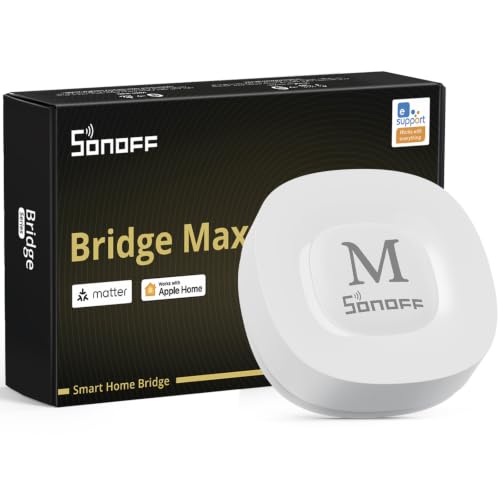
- Bridges Zigbee and BTHome devices to Matter
- Local web console without cloud dependence
- Built-in 90 dB alarm for sensor-based security
Best For: Cross-platform control of existing Zigbee devices
Established Multi-Protocol Automation

- Supports Zigbee and Z-Wave devices
- Automates routines from home events
- Compatible with Alexa and Google Home
Best For: App-centered automation across compatible Zigbee and Z-Wave devices
AI Camera & Automation Hub
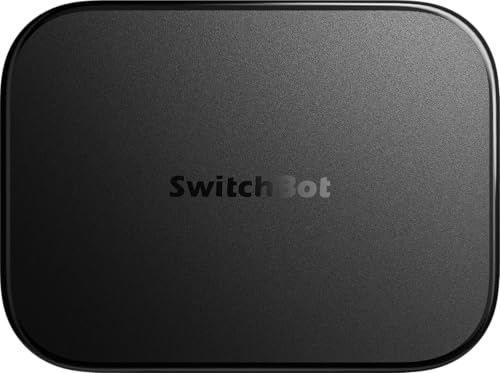
- OpenClaw support with compatible cameras and devices
- 16GB local storage included; expandable storage options
- Home Assistant pre-installed with Matter Bridge support
Best For: SwitchBot users focused on AI camera features and local video storage
Full-Protocol Automation Hub

- Seven protocols include Z-Wave, Zigbee, Matter, and Thread
- Works with 50,000+ devices from 1,000+ brands
- Local-first processing with advanced Homey Flow automation
Best For: Mixed-brand homes needing extensive protocol and automation support
Compact Local Automation Hub

- Local processing with control available when internet is down
- Built-in Zigbee, Matter, Thread, and Ethernet
- No subscription required for listed Homey features
Best For: Compact setups using modern protocols and subscription-free automation
Most Versatile – Homey Pro (2026)
Homey Pro (2026) is a strong choice among premium smart home hubs for households combining devices from many brands and communication standards. Its local-first processing, broad compatibility, energy insights, and advanced Flow automations make it suited to ambitious whole-home setups.
Best For: Multi-brand homes that want extensive protocol support and powerful local automation.
Pros:
- Supports Wi-Fi, Zigbee, Z-Wave Plus, infrared, BLE, Matter, and Thread in one hub.
- Works with more than 50,000 devices from over 1,000 brands.
- Processes automations locally and offers real-time and historical energy insights.
- Supports both straightforward Flows and more advanced browser-based automations.
Cons:
- Its broad feature set may be more than casual smart-home users need.
- Compatibility should be verified for specific brands and devices before purchase.
Homey Pro stands out when flexibility and expansion matter most. It is particularly compelling for users who want one central platform instead of several protocol-specific bridges.
Best Touchscreen Control – Amazon Echo Hub
The Amazon Echo Hub is a practical pick among premium smart home hubs for Alexa-centered households that prefer a dedicated visual control panel. Its customizable dashboard brings device controls, cameras, routines, security, and media into one wall-mountable interface.
Best For: Families wanting an easy-to-use touchscreen dashboard for Alexa-compatible devices.
Pros:
- Customizable sections and adjustable dashboard controls keep frequently used devices accessible.
- Built-in support for Wi-Fi, Bluetooth, Zigbee, Matter, Sidewalk, and Thread devices.
- Can manage compatible security systems, cameras, locks, alarms, and sensors.
- Supports wall mounting, tabletop stands, and optional power-over-Ethernet installation.
Cons:
- Some features, including Alexa+ and Ring-related capabilities, may require compatible subscriptions.
- Mounting accessories and a tabletop stand are sold separately.
Echo Hub is less about complex enthusiast automation and more about making everyday control visible and approachable. It is a particularly convenient fit where multiple family members need quick access to the smart home.
Best for DIY Automation – Hubitat Elevation C-8 Pro
Hubitat Elevation C-8 Pro earns a place among premium smart home hubs for users who prioritize local response, privacy, and detailed automation logic. It supports major protocols and combines a rule engine with community resources for building sophisticated routines without a subscription.
Best For: DIY smart-home builders who want local processing and deep automation control.
Pros:
- Runs automations on the hub, allowing routines to continue when the internet is unavailable.
- Supports Matter, Z-Wave 800 Series Long Range, Zigbee 3.0, and Bluetooth.
- Works with Alexa, Google Home, and Apple HomeKit.
- Includes Rule Machine, AI-assisted routine building, and dual external antennas for extended range.
Cons:
- Its advanced rule-building capabilities may have a steeper learning curve than simpler hubs.
- Some integrations and customizations may require consulting documentation or the online community.
The C-8 Pro is a compelling option when reliable local automation matters more than a polished touchscreen interface. Its no-subscription platform and active community also support long-term experimentation.
Best for Lutron Lighting – Lutron Caseta Smart Hub
The Lutron Caseta Smart Hub is a focused choice among premium smart home hubs for households building around Caseta lighting and compatible Lutron accessories. It connects to a router, supports major voice and smart-home platforms, and uses Clear Connect technology separately from Wi-Fi device traffic.
Best For: Lutron Caseta users who want reliable app, voice, and ecosystem integration.
Pros:
- Supports Alexa, Apple HomeKit, Google Assistant, Ring, Serena shades, and Sonos.
- Can support up to 75 Caseta devices as the system expands.
- Clear Connect technology does not compete with Wi-Fi-connected devices.
- Setup involves connecting the hub to a router and following instructions in the Lutron app.
Cons:
- It is primarily a Caseta-centered hub rather than a broad multi-protocol controller.
- Caseta dimmers, switches, and other coordinating accessories are sold separately.
For a Lutron-focused installation, the Caseta Smart Hub keeps setup straightforward while opening access to popular voice assistants and connected services. It is best viewed as the central bridge for a Caseta lighting ecosystem.
Advanced Local Control – Aqara Hub M3
For shoppers comparing premium smart home hubs, the Aqara Hub M3 stands out for its combination of Matter bridging, Zigbee and Thread support, local automation, and a built-in IR blaster. It is especially compelling for Aqara-focused homes that want broader ecosystem compatibility and more control over where automations run.
Best For: Aqara users building advanced, privacy-conscious automations with Matter, Zigbee, and Thread devices.
Pros:
- Supports Aqara Zigbee and Thread devices and bridges them to Matter ecosystems.
- Prioritizes local automations through its Edge Hub design.
- Includes a 360° IR blaster with feedback and learning for traditional remote-controlled devices.
- Offers dual-band Wi-Fi, PoE, encrypted local storage, and flexible mounting.
Cons:
- Supports up to 127 Aqara Zigbee devices, not third-party Zigbee devices.
- A 2A USB power adapter is not included.
- Some cloud-based notifications still require an internet connection.
The M3 is a strong premium choice when local processing, Matter integration, and Aqara device support matter more than simple plug-and-play control. Its limits around third-party Zigbee support are important to check before buying.
Flexible Matter Bridging – SONOFF Bridge Max
The SONOFF Bridge Max is a practical option among premium smart home hubs for connecting Zigbee, BTHome, and eWeLink devices to Matter platforms. Its local web console and security-focused features make it useful for shoppers who want cross-platform control without depending on a cloud service for configuration.
Best For: Users bridging existing Zigbee devices into Alexa, Google Home, Apple Home, or Home Assistant setups.
Pros:
- Bridges Zigbee, BTHome, and eWeLink devices to Matter platforms.
- Provides a local web console that works over the LAN without requiring an app or cloud service.
- Supports third-party Zigbee devices and local automations.
- Offers a 90 dB alarm and mobile notifications when paired with Zigbee sensors.
Cons:
- Does not function as a Matter Hub or Matter Controller.
- Cannot add Matter devices directly.
- Some advanced Home Assistant integrations require MQTT or bridging configurations.
Choose the Bridge Max when your main goal is bringing non-Matter devices into Matter-compatible platforms. It is less suitable if you need a hub that directly commissions and controls Matter devices.
Established Multi-Protocol Automation – SmartThings Hub 3rd Gen
The SmartThings Hub 3rd Generation remains a straightforward choice for shoppers evaluating premium smart home hubs around app-based automation. It brings compatible devices together in one smartphone app and supports Zigbee, Z-Wave, cloud-to-cloud protocols, Alexa, and Google Home.
Best For: Households wanting centralized smartphone control and event-based routines across compatible smart devices.
Pros:
- Supports Zigbee, Z-Wave, and cloud-to-cloud protocols.
- Automates devices based on events such as doors opening or people arriving.
- Works with compatible Alexa and Google Home setups.
- Includes a hub, power adapter, quick-start materials, and LAN cable.
Cons:
- Compatibility depends on the connected products and supported protocols.
- The supplied notes do not specify Matter support.
- Some functionality may rely on the SmartThings app and compatible services.
This hub is a sensible fit for users who prefer a familiar SmartThings app and broad Zigbee/Z-Wave compatibility. Consider a newer Matter-focused hub instead if direct Matter integration is a priority.
AI Camera & Automation Hub – SwitchBot AI Hub
The SwitchBot AI Hub is a camera-focused option for shoppers seeking premium smart home hubs with local storage, Home Assistant, and Matter support. It combines OpenClaw support with event recording and faster local automations for compatible SwitchBot devices.
Best For: SwitchBot households that want AI-assisted camera context, local video storage, and expanded smart home control.
Pros:
- Built-in OpenClaw support can connect compatible cameras and devices for chat-based control and camera-aware skills.
- Includes a 16GB MicroSD card and supports storage expansion up to 1TB MicroSD or 16TB external hard drive.
- Home Assistant comes pre-installed, while Matter Bridge support expands compatible setups.
- Can manage up to eight compatible cameras and provide faster local automations for select SwitchBot BLE devices.
Cons:
- AI features require an AI+ subscription and compatible cameras.
- It does not include IR control for TVs or air conditioners.
This is a specialized premium smart home hub for buyers who prioritize cameras, local recordings, and AI-assisted control. Those needing infrared appliance control will need an additional SwitchBot hub.
Full-Protocol Automation Hub – Homey Pro (Early 2023)
Homey Pro is a versatile choice among premium smart home hubs, combining seven wireless technologies with broad brand compatibility and local-first processing. Its Homey Flow system supports both simple routines and advanced automations.
Best For: Advanced smart home users who want broad device compatibility, local processing, energy monitoring, and flexible automation tools.
Pros:
- Supports Wi-Fi, Zigbee, Z-Wave Plus, infrared, BLE, Matter, and Thread in one hub.
- Works with more than 50,000 devices from over 1,000 brands, including popular lighting, security, audio, and appliance brands.
- Processes automations locally, stores data on the hub, and minimizes cloud dependency.
- Homey Flow and Advanced Flow support detailed routines, alerts, and energy-saving automations.
Cons:
- The wide range of supported brands and community apps may require compatibility checking before purchase.
- Its feature-rich automation platform may be more than casual users need.
Homey Pro stands out when protocol coverage and automation flexibility matter most. It is a strong central hub for a mixed-brand home, particularly for users interested in local control and energy management.
Compact Local Automation Hub – Homey Pro mini
Homey Pro mini offers a compact route into premium smart home hubs, with local processing, Ethernet, Zigbee, Matter, and Thread built in. It supports Homey Flow routines and broad brand compatibility without requiring a subscription for its listed features.
Best For: Buyers who want affordable-feeling, local smart home automation with core modern protocols and no monthly fee.
Pros:
- Processes smart home data locally, including when the internet is down.
- Supports Zigbee, Matter, Thread, and Ethernet out of the box.
- Works with devices from more than 1,000 brands through official and community Homey Apps.
- Includes remote access and voice assistant integrations without a subscription, plus local or cloud backups.
Cons:
- Z-Wave, Bluetooth, and infrared require the separately sold Homey Bridge.
- It has a narrower built-in protocol selection than the full-size Homey Pro.
Homey Pro mini is a practical pick for a streamlined setup centered on Ethernet and newer standards. Consider the full-size model or an added Homey Bridge if your devices rely on Z-Wave, Bluetooth, or infrared.
How We Picked the Best Premium Smart Home Hubs
We evaluated these Premium Smart Home Hubs by looking at the features that matter most after installation: supported wireless protocols, local-versus-cloud control, automation depth, device compatibility, voice-assistant support, expandability, and ease of management. We also considered whether each hub is best suited to a particular ecosystem, such as Alexa, Apple Home, Google Home, Matter, Z-Wave, Zigbee, or Home Assistant.
Protocol breadth matters, but it is not the only measure of quality. A hub with fewer radios may be a better choice if it offers stronger local automation, simpler setup, or better compatibility with the devices you already own.
Quick Comparison
| What to Compare | Why It Matters |
|---|---|
| Supported protocols | Determines which lights, locks, sensors, switches, and appliances can connect directly. |
| Local automation | Helps routines continue working during internet outages and can reduce response times. |
| Ecosystem support | Shows how well the hub works with Alexa, Google Home, Apple Home, Matter, or Home Assistant. |
| Expansion options | Includes additional radios, Ethernet, IR control, cameras, and advanced automation tools. |
Key Buying Factors for Premium Smart Home Hubs
Protocol and Device Compatibility
Check the exact standards used by your current and planned devices. Z-Wave and Zigbee remain useful for broad accessory selection, while Matter and Thread can simplify newer cross-platform setups. Wi-Fi and Bluetooth support are convenient, but they do not automatically guarantee compatibility with every product.
Local Processing and Reliability
Prioritize local control if you depend on lighting, security, climate, or access routines. Cloud features may provide remote access and advanced services, but a hub that can run core automations locally is generally more resilient.
Automation and Administration
Some hubs favor simple scenes and dashboard control, while others provide detailed rules, variables, conditions, and device actions. Choose the level of control you will realistically use. A powerful hub can become frustrating if its software is difficult to configure.
Future-Proofing and Privacy
Matter and Thread support can help with future device purchases, but implementation varies by platform. Also review account requirements, subscription features, remote-access policies, and data handling before committing to a central hub.
Who Should Buy Which Premium Smart Home Hubs?
Choose a multi-protocol hub such as Homey Pro if you want one system to bridge a diverse collection of devices and standards. Hubitat is a strong fit for enthusiasts who value detailed rules and local automation. Lutron Caseta is especially sensible for households centered on Lutron lighting, while Aqara and SwitchBot hubs suit buyers invested in those ecosystems and their accessory ranges.
Amazon Echo Hub and SmartThings are practical choices for users who want familiar dashboards, voice control, and broad mainstream integration. SONOFF is worth considering for compatible budget-conscious accessories, while Homey Pro mini is better for smaller, newer setups that prioritize Ethernet, Matter, Thread, and Zigbee without needing every advanced feature of a full-size hub.