Finding the right smart lock is about more than convenience. The best premium smart door locks should combine strong security, reliable connectivity, and everyday ease of use.
Below, we focus on standout options with modern features like Wi-Fi control, fingerprint access, palm vein recognition, and smart-home compatibility.
Best 10 Premium Smart Door Locks Picks for 2026
Thread-Ready Premium Lock
ULTRALOQ Bolt SE Wi-Fi Smart Lock

- Fingerprint, passcode, app, web, and voice access
- Built-in Wi-Fi plus Matter over Thread support
- 18-month battery life and IP65 design
Best For: Homes wanting many access methods and Matter support
Biometric Video Entry Lock

- Palm vein unlock with local data storage
- Built-in 2K camera and rear video screen
- Works with Matter and major smart home platforms
Best For: Families wanting biometric entry with video monitoring
Complete Handle Set Lock

- Includes matching lever handles and deadbolt
- Fingerprint, PIN, key, and app access
- Remote control with Wi-Fi and voice assistants
Best For: Front doors needing a full lock-and-handle upgrade
Palm Vein Security Lock
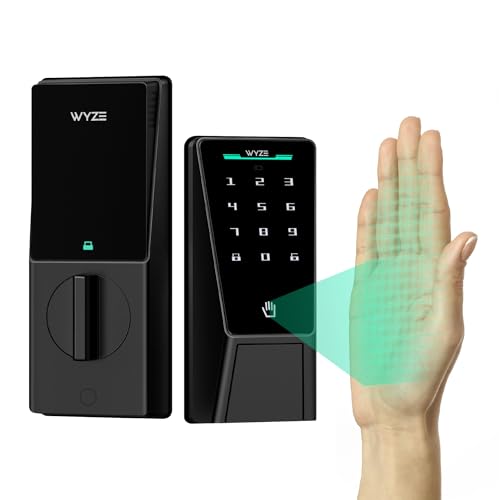
- Contactless palm vein recognition
- Dual-battery system with USB-C emergency charging
- Up to 50 codes with auto-lock and alarms
Best For: People wanting biometric entry with strong backup power
Premium WiFi Deadbolt for Whole-Home Control
Schlage Encode Camelot Smart WiFi Deadbolt

- Built-in WiFi for remote lock control and monitoring
- Supports up to 100 access codes and lock history
- Alexa and Google Home compatible with auto-lock
Best For: Homeowners who want a straightforward WiFi deadbolt with strong security features
Fingerprint Convenience with Built-In WiFi

- Six unlock methods, including fingerprint and Apple Watch
- Built-in WiFi enables remote control without a bridge
- BHMA Grade 3 certified with alarm and IP53 design
Best For: Families or frequent users who want quick fingerprint access and built-in WiFi control
Physical Keypad Simplicity with Smart WiFi
Schlage Arrive Camelot WiFi Deadbolt

- Built-in WiFi for remote control and notifications
- Manages up to 250 access codes in the app
- Backlit physical keypad with Alexa and Google support
Best For: Buyers who want a durable push-button smart lock with app control and simple code entry
Facial Recognition Security
Lockly Visage Zeno Series Smart Lock with Facial Recognition

- Facial recognition with dual infrared sensors
- Six unlock methods including Apple Home Key
- Built-in Wi-Fi with remote app control
Best For: Homeowners who want high-end biometric access with Apple Home Key support and built-in Wi-Fi.
All-in-One Handle Set
Philips WiFi Keypad Door Lock with Handle

- Built-in Wi-Fi with no hub required
- Fingerprint, keypad, app, and voice unlock
- Includes matching handle set
Best For: Buyers who want a complete handle-and-deadbolt smart lock with remote access and family-friendly entry options.
Flexible Front-Door Control
Philips Wi-Fi Smart Lock for Front Door

- Five ways to unlock, including fingerprint and app
- 100 smart passcodes for rentals and guests
- Direct 2.4GHz Wi-Fi with notifications
Best For: Homeowners, Airbnb hosts, and renters who want flexible access management with multiple unlock methods.
Thread-Ready Premium Lock – ULTRALOQ Bolt SE Wi-Fi Smart Lock
If you’re comparing premium smart door locks for a main entry, the ULTRALOQ Bolt SE stands out for broad access options and flexible remote control. It combines fingerprint entry, passcodes, app access, web portal management, and Matter over Thread support, so it fits both everyday family use and connected-home setups.
Best For: Homeowners who want multiple unlock methods, remote management, and Matter compatibility in one lock.
Pros:
- 7-in-1 keyless entry with fingerprint, passcode, app, web portal, eKey sharing, voice control, and mechanical keys
- Built-in Wi-Fi and Matter over Thread support for remote access and smart home integration
- Up to 50 fingerprints and 50 access codes, plus activity history and notifications
- 18-month battery life and IP65 weather resistance for outdoor doors
Cons:
- Matter over Thread remote access requires a compatible Thread Border Router
- Built-in Wi-Fi supports 2.4 GHz only
- Door sensor is not included
Overall, this is a strong fit if you want a premium smart lock that balances convenience, smart-home support, and practical battery life without giving up traditional key backup.
Biometric Video Entry Lock – eufy FamiLock S3 Max
The eufy Security Smart Lock FamiLock S3 Max is aimed at buyers who want premium smart door locks with both advanced entry control and built-in front-door monitoring. Its palm vein unlock, 2K camera, and rear lock video screen make it more of an all-in-one entry system than a standard deadbolt.
Best For: Households that want biometric access plus a built-in camera and rear display.
Pros:
- Palm vein unlocking in about 0.6 seconds with local data storage
- Built-in 2K HD camera, video doorbell features, and 150° head-to-toe view
- Rear lock video screen for checking the front door without using a phone
- Supports Matter, Apple Home, Google Home, Alexa, and SmartThings
Cons:
- Camera streams are not supported via Matter
- HomeBase 2 is not compatible
- Best experience is through the eufy app rather than Matter alone
This model makes sense if you want more than a lock: it adds front-door visibility, local privacy-focused storage, and easy viewing for family members who may not want to rely on a smartphone.
Complete Handle Set Lock – Philips Wi-Fi Smart Deadbolt
If you want premium smart door locks that replace more than just the deadbolt, this Philips Wi-Fi smart lock set is a practical all-in-one option. It includes two lever handles and adds fingerprint, PIN, key, app, Wi-Fi, and voice control, making it a good upgrade for a full front-door refresh.
Best For: Buyers who want a smart lock set with matching handles and multiple unlock methods.
Pros:
- Includes two lever handles plus the Wi-Fi smart lock
- Four unlock methods: fingerprint, PIN code, key, and app
- Remote control through 2.4GHz Wi-Fi with notifications and access history
- Works with Alexa and Google Assistant for voice control
Cons:
- Auto-lock depends on the door being fully closed because there is no sensor
- Optional exterior screw requires drilling if used
- Wi-Fi support is limited to 2.4GHz
This is a good choice if you want a coordinated lock-and-handle bundle with dependable daily access options and app-based control, rather than a lock-only replacement.
Palm Vein Security Lock – Wyze Palm Lock
The Wyze Palm Lock is a feature-heavy option for shoppers comparing premium smart door locks with modern biometrics and strong backup features. Its contactless palm vein recognition, dual-battery system, Wi-Fi control, and keypad access make it a versatile fit for everyday use and guest access.
Best For: Users who want contactless biometric entry with strong battery backup and smart alerts.
Pros:
- Contactless palm vein recognition for fast, secure unlocking
- Dual-battery setup with emergency USB-C charging support
- Auto-lock uses a gyroscope to detect when the door closes
- Supports up to 50 unique or one-time access codes with anti-peep protection
Cons:
- Smart battery-saving features may be more complex than basic locks
- Requires app use for notifications and some customization
- Best features depend on Wi-Fi and smart-home integration
For buyers who want a modern lock with contactless entry, solid backup power, and practical security extras, this Wyze model covers a lot of ground without dropping traditional key support.
Premium WiFi Deadbolt for Whole-Home Control – Schlage Encode Camelot Smart WiFi Deadbolt
If you want premium smart door locks with dependable app control and a familiar keypad design, the Schlage Encode is built for everyday convenience. Its built-in WiFi lets you lock, unlock, and monitor the door from anywhere through the Schlage Home app, while Alexa and Google Home support adds hands-free options.
Best For: Homeowners who want a straightforward WiFi deadbolt with strong security features and remote access.
Pros:
- Built-in WiFi means no extra hub is required for remote control.
- Supports up to 100 access codes and app-based lock history.
- Includes auto-lock, one-touch locking, and customizable notifications.
- BHMA-certified highest residential Security, Durability, and Finish rating.
Cons:
- Uses four AA batteries, so power management matters over time.
- Relies on the Schlage Home app for full remote and voice features.
For buyers who want a proven connected deadbolt, this model balances ease of installation, secure WiFi access, and practical everyday features. It is a strong fit if you prefer a keypad-first smart lock with broad smart home compatibility and a backup key.
Fingerprint Convenience with Built-In WiFi – eufy Security Smart Lock C220
The eufy Security Smart Lock C220 is a strong option in premium smart door locks if you want fast fingerprint entry plus app control without adding a bridge. It gives you six ways to unlock, including fingerprint, keypad, app, physical key, Apple Watch, and voice control through Alexa or Google Voice Assistant.
Best For: Families or frequent users who want quick fingerprint access and built-in WiFi control.
Pros:
- Fingerprint unlock works in under 1 second and improves with self-learning AI.
- Built-in WiFi allows remote control in the eufy Security app with no bridge required.
- Eight AA batteries are rated for around 8 months of use.
- BHMA Grade 3 certified, with alarm alerts and IP53 waterproof protection.
Cons:
- Battery life can vary depending on how often the lock is used.
- Best app-based routines are most useful if you already use the eufy ecosystem.
This lock stands out for speed and flexibility, especially if fingerprint entry is your priority. Its built-in WiFi and easy installation make it a practical upgrade for standard deadbolts.
Physical Keypad Simplicity with Smart WiFi – Schlage Arrive Camelot WiFi Deadbolt
If you prefer premium smart door locks with a physical keypad instead of a touchscreen, the Schlage Arrive is designed for easy access and dependable remote management. Built-in WiFi lets you use the Schlage Home app to control the lock away from home, and the push-button keypad is backlit for low-light entry.
Best For: Buyers who want a durable push-button smart lock with app control and simple code entry.
Pros:
- Built-in WiFi supports remote locking, unlocking, and notifications.
- Can manage up to 250 access codes through the Schlage Home app.
- Push-button keypad uses durable, all-weather silicone buttons.
- Works with Alexa and Google Home for voice control and routines.
Cons:
- Requires the Schlage Home app for full remote management features.
- Like any battery-powered lock, it depends on battery maintenance.
The Arrive is a good choice if you want a more tactile keypad experience without giving up WiFi connectivity. It combines easy installation, strong security credentials, and flexible access-code management for everyday use.
Facial Recognition Security – Lockly Visage Zeno Series Smart Lock with Facial Recognition
For buyers comparing premium smart door locks, the Lockly Visage Zeno Series stands out with face unlock, fingerprint access, and broad smart home support. It is built for hands-free entry, quick biometric recognition, and remote control through the Lockly Home app without needing a bridge.
Best For: Homeowners who want high-end biometric access with Apple Home Key support and built-in Wi-Fi.
Pros:
- Facial recognition unlocks automatically with dual infrared sensors for better accuracy in low light.
- Supports six unlock methods, including fingerprint, keypad, app, physical key, Apple Watch, and voice assistants.
- Built-in Wi-Fi lets you lock, unlock, and manage access remotely without a separate hub.
- Easy DIY installation and a rechargeable battery setup designed to last months between charges.
Cons:
- Apple Home Key features are most useful if you already use Apple devices.
- Facial recognition may be more than some households need for a basic front-door upgrade.
- Requires compatible door thickness and swing direction for the stated fit range.
This is a strong option if you want a feature-rich lock that emphasizes convenience and security in equal measure. The combination of face recognition, fingerprint access, and remote app management makes it a premium-style front door upgrade.
All-in-One Handle Set – Philips WiFi Keypad Door Lock with Handle
This Philips model is a practical pick among premium smart door locks if you want a full front-door set with handle included. It connects directly to 2.4GHz Wi-Fi, supports fingerprint and code entry, and gives you app-based control for locking, monitoring, and managing access from anywhere.
Best For: Buyers who want a complete handle-and-deadbolt smart lock with remote access and family-friendly entry options.
Pros:
- Built-in Wi-Fi means no hub or bridge is needed for remote control.
- Fast fingerprint unlock and multiple passcode types make it flexible for families and guests.
- Includes a matching handle set, so you get a more complete front-door upgrade in one purchase.
- Voice assistant support and auto-lock add convenience for daily use.
Cons:
- Uses 8 AA batteries, which are not included.
- Requires activation steps after installation, including holding the reset button.
- Works on 2.4GHz Wi-Fi only, so network compatibility matters.
Overall, this is a well-rounded choice if you want premium smart lock features without buying extra hardware to finish the door set. It balances convenience, access sharing, and straightforward installation for typical front-door use.
Flexible Front-Door Control – Philips Wi-Fi Smart Lock for Front Door
For shoppers comparing premium smart door locks, this Philips Wi-Fi model focuses on everyday convenience and access control. It combines fingerprint entry, app remote control, voice support, and keypad passcodes in a design that is easy to manage for households and rental-style use.
Best For: Homeowners, Airbnb hosts, and renters who want flexible access management with multiple unlock methods.
Pros:
- Five unlock methods provide flexibility, including fingerprint, PIN code, app, voice, and physical key.
- Direct 2.4GHz Wi-Fi connection allows remote control and activity notifications without a hub.
- Supports 100 smart passcodes, including permanent, recurring, date-range, and one-time options.
- Auto-lock and one-touch locking add convenience for busy routines.
Cons:
- Requires 8 AA alkaline batteries, sold separately.
- Voice control depends on Alexa or Google Assistant compatibility.
- Wi-Fi support is limited to 2.4GHz networks.
This lock is a practical fit if you want broad access options without extra hardware or complicated setup. The strong passcode management and remote monitoring features make it especially useful for shared homes and short-term rentals.
How We Picked the Best Premium Smart Door Locks
We prioritized locks that balance security, ease of installation, and dependable daily use. For Premium Smart Door Locks, that means looking beyond flashy features to evaluate access methods, app quality, auto-lock behavior, backup entry options, and support for common smart-home platforms.
We also favored models with strong connectivity choices, especially built-in Wi-Fi or Matter support, because those make remote control and guest access much simpler.
Quick Comparison: What Matters Most
If you want the simplest upgrade, a Wi-Fi deadbolt with app control is usually the easiest choice. If you want faster and more secure unlocking, fingerprint and palm vein models stand out. For the most advanced hands-free experience, facial recognition is the most premium-feeling option, though it should still include alternate unlock methods.
Hardware also matters. Some buyers want a full front-door lock set with a handle, while others only need a deadbolt replacement. Make sure the format matches your existing door setup before you buy.
Key Buying Factors for Premium Smart Door Locks
Security and Backup Access
Choose a lock with multiple ways to enter, such as keypad, app, fingerprint, or a physical key. Backup power, temporary access codes, and auto-lock features can add peace of mind.
Connectivity and Smart-Home Support
Built-in Wi-Fi is convenient for remote access, but Matter or Thread support can improve compatibility and future-proofing. Check whether the lock works with your preferred ecosystem before deciding.
Biometric Performance
Fingerprint and palm vein systems can be faster than PIN codes, but they vary in speed and reliability. Look for models designed for quick recognition in real-world use, especially if multiple people will use the lock daily.
Installation and Door Compatibility
Confirm door thickness, deadbolt style, and whether you need a single deadbolt or a handle set. A premium lock is only worth it if it fits cleanly and operates smoothly on your door.
Who Should Buy Which Premium Smart Door Locks?
If you want straightforward remote access, choose a Wi-Fi smart deadbolt. If your household values speed and low-friction entry, fingerprint or palm vein options make sense. If you want the most advanced and convenient experience, consider facial-recognition models. And if you are replacing both the lock and handle, a full smart lock set may be the best fit.
For most shoppers, the best Premium Smart Door Locks are the ones that match daily routines first and feature lists second. Pick the access method you will actually use, then verify compatibility, backup entry, and smart-home support.