Keypad door locks make it easier to enter your home without carrying or handing out physical keys. The best models combine dependable locking hardware with convenient codes, auto-lock settings, and—on smart versions—remote control.
Our 2026 roundup compares 10 keypad locks across deadbolts, door knobs, lever handles, fingerprint access, and Wi-Fi-enabled designs, helping you find the right fit for your door and routine.
Best 10 Keypad Door Locks Picks for 2026
Best Value Keypad Lock

- 20 user codes plus a one-time guest PIN
- Adjustable auto-lock and one-touch locking
- IP54 protection with backup keys
Best For: Families, rentals, and straightforward keyless entry
Best Keypad Lever Lock
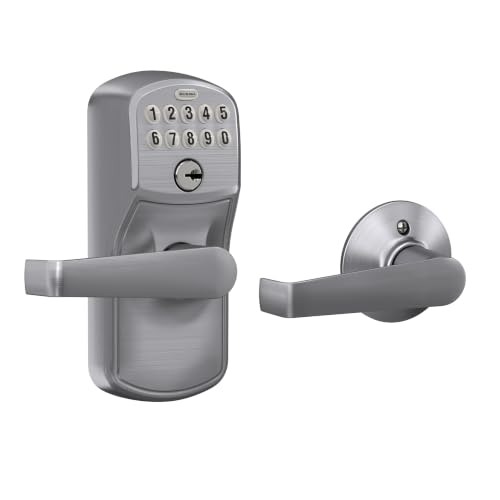
- Five-second automatic re-locking
- Grade 2/AAA-rated metal construction
- Illuminated push-button keypad
Best For: Residential and light commercial lever-handle replacement
Best Smart Keypad Lock

- Fingerprint, app, code, and key entry
- Remote codes, permissions, and activity logs
- Local AES128-encrypted access data
Best For: Multi-user properties and remote access management
Best WiFi Keypad Lock

- Built-in 2.4GHz WiFi with no hub required
- Fingerprint, PIN, app, and voice control
- Includes a matching handle set
Best For: Remote access and biometric entry
Best Keypad Handle Set

- 20 permanent codes plus one-time passwords
- Backlit keypad with anti-peeping protection
- ANSI Grade 3, BHMA tested, and IP54 rated
Best For: Families wanting flexible local access
Best Keypad Door Knob
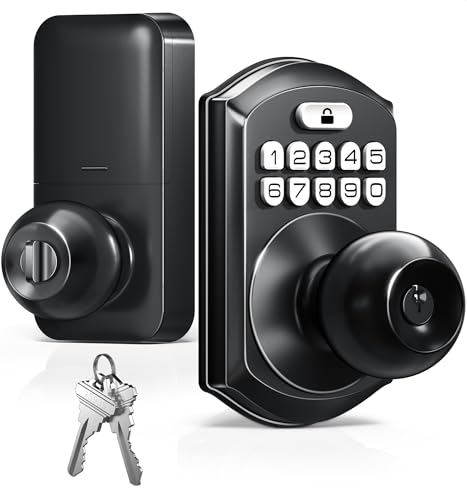
- Up to 20 codes and one-time guest passcodes
- Adjustable auto-lock and passage mode
- IP54 protection with a backlit keypad
Best For: Rentals, bedrooms, and office doors
Best Traditional Keypad Deadbolt
Amazon Basics Electronic Keypad Deadbolt

- Six user codes plus one-time guest codes
- 10–99-second automatic locking
- Keypad, key, and thumb-turn access
Best For: Standard residential and commercial doors
Best Heavy-Duty Pick
Yamiry Keyless Entry Digital Lock

- Up to 20 user codes and one-time codes
- Backlit keypad with low-battery alert
- 5–99-second auto-lock or disable option
Best For: Home doors needing a keypad knob
Best Feature-Rich Keypad Handle
TEEHO TE004 Keyless Entry Lock

- 20 PINs, temporary codes, and two backup keys
- Passage mode, one-touch lock, and auto-lock
- Anti-peeping keypad and failed-attempt shutdown
Best For: Versatile entry on compatible interior or exterior doors
Best Value Keypad Lock – TEEHO TE001 Keypad Deadbolt
The TEEHO TE001 is a practical choice for shoppers comparing keypad door locks for front, back, indoor, rental, or garage doors. It provides multiple user codes, a temporary one-time PIN, automatic locking, and key backup without requiring an app or network connection.
Best For: Families, rental properties, and homeowners who want flexible code access and straightforward installation.
Pros:
- Supports up to 20 individual user codes plus a single-use guest code.
- Offers adjustable auto-lock timing from 10 to 99 seconds and one-touch locking.
- Includes anti-peeping protection, low-battery alerts, IP54 weather resistance, and two backup keys.
- Installs with a screwdriver and includes a two-year warranty with lifetime customer service.
Cons:
- Requires four AA batteries, which are not included.
- Fits 2-1/8-inch door holes and is not compatible with 38mm holes.
- Must be reset before first use to detect the door handing.
With useful access-code management and no connectivity requirements, the TE001 is a sensible keypad door lock for basic, flexible entry control. Confirm your door-hole size before ordering.
Best Keypad Lever Lock – Schlage Camelot Keypad Lever
The Schlage Camelot keypad lever is a solid option among keypad door locks when you want keyless access in a familiar lever-handle format. Its illuminated push-button keypad, automatic re-locking, metal construction, and simple screwdriver installation suit residential and light commercial use.
Best For: Homeowners and light commercial users who prefer a keypad lock with an integrated lever handle.
Pros:
- Automatically re-locks five seconds after a valid code is entered.
- Grade 2/AAA-rated construction is designed for residential and light commercial applications.
- Illuminated silicone-coated numbers improve visibility in the dark.
- Uses an included 9V battery with a low-battery indicator and up to two years of typical battery life.
Cons:
- Provides lever-style entry rather than a deadbolt-only design.
- Its keypad operation is push-button based, without listed app connectivity.
- Automatic re-locking occurs after five seconds, leaving little time before relocking.
This Schlage model is a dependable fit for replacing an existing lever or knob with keypad access. Its short auto-lock interval is convenient for security but should be considered if you regularly need the door to remain open.
Best Smart Keypad Lock – Veise VE017 Fingerprint Lock
The Veise VE017 expands beyond standard keypad door locks with fingerprint entry, app control, access logs, and several code types. It is designed for users who want remote access management and multiple unlocking methods, with a required G1 Gateway for Alexa or Google Assistant compatibility.
Best For: Multi-tenant properties, busy households, and hosts who need remote user and permission management.
Pros:
- Supports fingerprint, app, code, fob card, authorized access, mechanical key, and other listed methods.
- Allows one-time, duration, permanent, and recurring codes through the app.
- Provides activity logs, remote permission changes, alerts, and locally stored AES128-encrypted access data.
- Offers adjustable auto-lock timing from 0 to 180 seconds and anti-peeping PIN protection.
Cons:
- Alexa and Google Assistant compatibility requires the separately referenced G1 Gateway.
- Its broader feature set and app-based management may be more than needed for basic keypad entry.
- The supplied notes truncate the battery details after stating a 12-month-or-more battery claim, so exact battery specifications should be verified.
The VE017 is the most feature-rich option here, particularly for managing multiple users remotely. Choose it when fingerprints, detailed access tracking, and flexible code sharing matter more than simple plug-and-play keypad operation.
Best Traditional Deadbolt – Schlage Camelot Keypad Deadbolt
The Schlage Camelot keypad deadbolt is a straightforward choice for shoppers seeking keypad door locks without app or hardwiring requirements. It combines a Grade 2/AAA-rated metal design with illuminated push buttons, mechanical thumbturn operation, and key backup.
Best For: Homeowners replacing a standard deadbolt who want simple code-based entry and familiar manual operation.
Pros:
- Grade 2/AAA-rated construction supports residential and light commercial security needs.
- Illuminated, silicone-coated numbers make nighttime code entry easier.
- Installs over an existing deadbolt with a screwdriver and no hardwiring.
- Includes a 9V battery, programming code, and key backup.
Cons:
- Does not list remote app access, temporary-code management, or automatic re-locking.
- Locking from outside requires pressing the Schlage button and turning the thumbturn.
- Warranty coverage lists limited lifetime mechanical coverage but only one year for electronics.
This model favors dependable, conventional keypad operation over connected features. It is a good match for users who want to eliminate routine key use while retaining mechanical controls and backup access.
Best WiFi Keypad Lock – Philips WiFi Keypad Deadbolt
For shoppers comparing keypad door locks with remote access, the Philips 4200 Series combines built-in 2.4GHz WiFi with fingerprint entry, app controls, and a matching handle set. It is designed for front-door upgrades and does not require a separate hub.
Best For: Homeowners who want app-based access management, fingerprint unlocking, and voice-assistant compatibility.
Pros:
- Built-in WiFi enables remote lock control, access-code management, status checks, and access-history monitoring without an extra hub.
- Supports permanent, one-time, periodic, and recurring PIN codes, plus fast fingerprint access.
- Includes a matching handle set and supports auto-lock settings from 0 to 180 seconds.
- Works with Alexa and Google Assistant for voice commands.
Cons:
- Requires a 2.4GHz WiFi connection within about 33 feet of the router for reliable connectivity.
- Batteries are not included, and the manufacturer specifies standard 1.5V alkaline batteries.
- Auto-lock is off by default, and left-opening doors require resetting the lock direction.
This is the most feature-rich option in this group, especially for users who want remote access and biometric entry. Check door thickness and WiFi placement before installation.
Best Keypad Handle Set – Veise KS01B Keypad Door Lock
The Veise KS01B is a practical choice among keypad door locks when you want a complete lever-handle set with multiple user codes, backup keys, and straightforward operation. Its backlit keypad and physical controls suit busy households and exterior entry points.
Best For: Families and homeowners seeking a durable, non-connected keypad lock with flexible codes and lever handles.
Pros:
- Provides one master code, 20 permanent user codes, one-time passwords, and backup keys.
- Offers auto-lock from 10 to 99 seconds, one-touch locking, vacation mode, silent mode, and passage mode.
- Backlit keypad, anti-peeping password support, failed-entry lockout, and low-battery alerts add everyday convenience.
- Rated ANSI Grade 3 and BHMA tested, with IP54 resistance and support for doors 1-3/8 to 2 inches thick.
Cons:
- Uses four AA alkaline batteries, which are not included.
- It does not provide the app-based remote control or fingerprint access offered by connected models.
- The manufacturer advises keeping liquids away from the keyhole and avoiding prolonged direct sunlight.
With its versatile access modes and conventional lever design, the KS01B is a well-rounded option for front, back, garage, or office-entry doors. It is especially appealing if you prefer local keypad operation over smart-home connectivity.
Best Keypad Door Knob – TEEHO TE003 Keypad Door Knob
The TEEHO TE003 is a compact keypad door knob for homes, rentals, offices, and interior spaces. It supports user and one-time codes while retaining backup keys, and its standard installation requirements make it a flexible replacement for compatible doors.
Best For: Rental properties, bedrooms, offices, and entry doors needing simple keyless access with a knob-style design.
Pros:
- Supports up to 20 user codes, one-time passcodes, two backup keys, and passage mode.
- Offers adjustable 10- to 99-second auto-lock and one-touch locking by holding any keypad number.
- Backlit keypad, anti-peeping passwords, low-battery indicator, and IP54 protection support everyday use.
- Fits standard U.S. doors with 2-1/8-inch holes, 2-3/8- or 2-3/4-inch backsets, and 1-3/8- to 2-inch thickness.
Cons:
- Batteries are not included.
- It is ANSI Grade 3 rather than a higher security grade.
- It has no app, WiFi, fingerprint, or remote-access features.
The TE003 makes sense when you want keypad convenience without the complexity of a connected smart lock. Confirm your door measurements and desired knob location before ordering.
Best Traditional Keypad Deadbolt – Amazon Basics Electronic Keypad Deadbolt
If you want straightforward keypad door locks for a standard residential or commercial door, this Amazon Basics deadbolt focuses on essential keyless access. It supports six user codes, one-time guest codes, automatic locking, and traditional key entry.
Best For: Homes, offices, and other compatible doors needing a traditional keypad deadbolt with backup keys.
Pros:
- Supports six user codes plus temporary single-use guest codes.
- Auto-lock timing can be set from 10 to 99 seconds.
- Offers keypad entry, exterior key access, and an interior thumb turn.
- Fits standard door preparations and 1-3/8- to 1-3/4-inch-thick doors.
Cons:
- Provides six user codes, fewer than some competing keypad locks.
- Its deadbolt design may not suit shoppers specifically seeking a lever or knob.
This is a practical choice if you prefer a conventional deadbolt format and do not need app connectivity. Verify your door thickness and existing preparation before installation.
Best Heavy-Duty Pick – Yamiry Keyless Entry Digital Lock
This Yamiry keypad door knob is a compact option for shoppers replacing a knob rather than installing a deadbolt. Its backlit keypad supports up to 20 user codes, one-time guest access, physical key entry, and adjustable automatic locking.
Best For: Home doors where a keypad knob, simple screwdriver installation, and multiple user codes are priorities.
Pros:
- Stores up to 20 user codes and supports one-time guest codes.
- Backlit keypad and low-battery indicator support everyday use.
- Auto-lock can be set from 5 to 99 seconds or disabled.
- Includes two physical backup keys and is designed for installation with a screwdriver.
Cons:
- Its IP54 weather resistance is useful but does not indicate complete waterproofing.
- The notes do not specify a door-thickness range, so compatibility should be confirmed before purchase.
Choose this model when you want keypad access in a knob format with generous code capacity. Its straightforward design may appeal to homeowners who do not need a deadbolt or advanced connected features.
Best Feature-Rich Keypad Handle – TEEHO TE004 Keyless Entry Lock
The TEEHO TE004 combines keypad access with a lever handle and several convenience features. It supports 20 PIN codes, temporary codes, two backup keys, passage mode, anti-peeping password entry, break-in detection, and weather-resistant construction.
Best For: Front doors, apartments, offices, bedrooms, garages, and other compatible doors where flexible access modes are useful.
Pros:
- Offers 20 user PINs, automatically deleted one-time codes, and two backup keys.
- Includes auto-lock, one-touch locking, passage mode, and a backlit keypad.
- Anti-peeping entry and shutdown after 10 failed PIN attempts add access controls.
- Fits 1-3/8- to 2-inch doors and supports left- or right-handed installation.
Cons:
- Requires four AA batteries, which are not included.
- Battery life is listed as up to one year, so periodic replacement is still required.
- Its broader feature set may be more than needed for a basic interior door.
For shoppers comparing keypad door locks by flexibility, the TE004 stands out with passage mode, temporary codes, and added keypad protections. Check the bore, backset, and door-thickness measurements before ordering.
How We Picked the Best Keypad Door Locks
We focused on the features that matter most for everyday entry and home security: lock type, access methods, code management, installation requirements, power options, backup entry, and smart-home connectivity. The selection includes traditional electronic locks for straightforward keyless access as well as app-enabled and fingerprint models for households that want more control.
We also considered whether each design suits a front door, bedroom, rental, office, or secondary entry. A lock is only a good choice if its hardware matches the existing door preparation and users can operate it reliably.
Quick Comparison
- Best for simple keyless entry: Basic keypad deadbolts and lever locks with programmable user codes.
- Best for smart access: Wi-Fi or app-connected models that support remote locking, unlocking, and activity management.
- Best for key-free convenience: Fingerprint locks, which can reduce the need to remember codes.
- Best for complete hardware updates: Door knob or lever-set locks that replace the handle as well as the locking mechanism.
- Best for flexible guest access: Models offering multiple codes or temporary, one-time codes.
Key Buying Factors for Keypad Door Locks
Lock Type and Door Compatibility
Choose a deadbolt if you want to retain your existing handle, or select a knob or lever model when replacing the complete entry set. Check backset dimensions, door thickness, handing, and the required borehole pattern before ordering.
Access and Code Management
Look for enough user-code capacity for family members, guests, cleaners, or tenants. One-time codes are useful for deliveries and short visits, while fingerprint access can be convenient for frequent users.
Smart Features and Connectivity
Bluetooth models usually work nearby through a phone, while Wi-Fi versions can provide remote access and notifications without being at the door. Confirm whether a hub, subscription, or compatible app is required.
Power, Backup Entry, and Security
Review battery type and expected runtime, and prioritize models with low-battery alerts. A physical key override or emergency power option can prevent lockouts. Auto-lock is convenient, but adjustable timing is preferable so the door does not lock unexpectedly.
Who Should Buy Which Keypad Door Locks?
Choose a straightforward keypad deadbolt if you want affordable keyless entry with minimal setup. Pick a lever or knob lock when you need to replace an existing handle. App-connected Wi-Fi locks are best for homeowners and hosts who manage access remotely, while fingerprint models suit busy households that want fast entry without codes. For rentals, offices, or shared homes, prioritize durable hardware, several separate codes, and simple code deletion when access changes.