The best smart home hubs for home use bring lights, locks, sensors, thermostats, and other devices into one easier-to-manage system. The right choice depends on your preferred ecosystem, wireless standards, automation needs, and comfort with setup.
We compared ten notable hubs and starter kits for different households, including Alexa-focused controllers, flexible multi-protocol platforms, and specialized options for reliable lighting or long-range sensors.
Best 10 Smart Home Hubs for Home Use Picks for 2026
Best All-Around Connectivity

- Matter, Zigbee, Z-Wave Plus, and Wi-Fi support
- Alexa and Google Home compatible
- Ethernet or Wi-Fi connectivity
Best For: Mixed-brand smart homes using multiple protocols
Best Touchscreen Control Panel

- Customizable 8-inch smart home dashboard
- Built-in Zigbee, Matter, Thread, and Wi-Fi support
- Wall-mountable Alexa control center
Best For: Alexa users wanting shared, visual home control
Best for Local Automation

- Local processing for fast, offline-capable routines
- Matter, Z-Wave, Zigbee, and Bluetooth support
- No recurring subscription required
Best For: DIY enthusiasts seeking privacy and advanced rules
Best for Smart Lighting

- Supports up to 75 Caseta devices
- Works with Alexa, Apple HomeKit, and Google Assistant
- Clear Connect avoids Wi-Fi congestion
Best For: Caseta lighting systems with voice and app control
Flexible Matter Upgrade

- Matter Controller, Bridge, and Thread Border Router
- Supports up to 40 Zigbee and 40 Thread devices
- Local automation, IR control, and PoE support
Best For: Mixed-protocol homes seeking flexible Matter integration
Long-Range Simplicity

- Advertised range of up to 2,034 feet
- Plug-in wired hub with smartphone compatibility
- Supports voice control and motion alerts
Best For: Simple YoLink setups where range is a priority
Advanced Local Control
Aqara Hub M3 for Advanced Automation

- Supports up to 127 Aqara Zigbee and 127 Thread devices
- Local-first automation with encrypted 8GB storage
- Matter, IR, PoE, Wi-Fi, and broad ecosystem support
Best For: Large Aqara systems prioritizing local control and privacy
Best All-in-One Starter Kit

- Includes Echo Hub, plug, and four smart bulbs
- Guided setup for new smart-home users
- Works with thousands of Alexa-compatible devices
Best For: Alexa households starting with smart lighting and plugs
Best for Matter and Local Automation
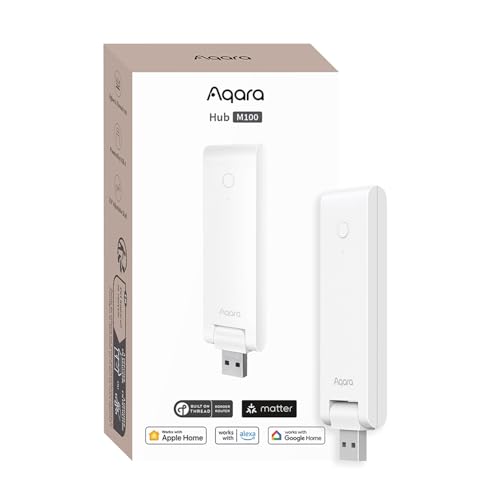
- Bridges supported Aqara Zigbee devices to Matter ecosystems
- Supports Thread and local automations
- Uses flexible USB-A power and Wi-Fi 6
Best For: Mixed Matter, Thread, and Aqara setups
Best for Aqara IR and Alarm Control

- Adds 360-degree IR control for common appliances
- Supports up to 128 Aqara Zigbee devices
- Works with Alexa, Google Assistant, and Apple HomeKit
Best For: Aqara homes needing IR and alarm features
Best All-Around Connectivity – Aeotec Smart Home Hub
If you want smart home hubs for home use that can connect devices from several major standards, the Aeotec Smart Home Hub is a flexible starting point. It supports Matter, SmartThings, Z-Wave Plus, Zigbee, and Wi-Fi, with app and voice control through Alexa or Google Home.
Best For: Households building a mixed-brand smart home with varied device protocols.
Pros:
- Supports Matter, Z-Wave Plus, Zigbee, SmartThings, and Wi-Fi devices.
- Works with Alexa and Google Home voice assistants.
- Offers Ethernet or Wi-Fi setup and supports local automations for improved responsiveness.
- SmartThings app works on Android, iOS, and iPadOS.
Cons:
- Designed for use in North America.
- Z-Wave Plus support is specified for the V3 model.
The Aeotec hub is a practical choice when compatibility matters more than having a built-in touchscreen. Its broad protocol support and SmartThings automation tools make it suitable for gradually expanding a connected home.
Best Touchscreen Control Panel – Amazon Echo Hub
Among smart home hubs for home use, the Amazon Echo Hub stands out as a dedicated, wall-mountable control panel. Its customizable 8-inch dashboard lets household members adjust devices, view cameras, start routines, and manage compatible security systems from one screen.
Best For: Alexa households that want an easy-to-see central dashboard for everyday control.
Pros:
- Customizable dashboard with resizable sections for devices and routines.
- Built-in support for Wi-Fi, Bluetooth, Zigbee, Matter, Sidewalk, and Thread devices.
- Works with thousands of Alexa-compatible devices.
- Can be wall mounted and includes privacy controls such as a microphone-off button.
Cons:
- Wall cable pass-through, power-over-Ethernet, and tabletop stands are sold separately.
- Some Ring features require Alexa+ and a compatible Ring subscription sold separately.
The Echo Hub is particularly convenient for families that prefer visual controls instead of relying only on phone apps or voice commands. It also adds media controls and centralized security access, although its strongest fit is within an Alexa-centered setup.
Best for Local Automation – Hubitat Elevation C-8 Pro
The Hubitat Elevation C-8 Pro is one of the more automation-focused smart home hubs for home use. It processes routines locally, supports several wireless standards, and provides an advanced rule engine for homeowners who want fast responses, privacy, and detailed customization without a subscription.
Best For: DIY users who want powerful local automations and broad device compatibility.
Pros:
- Local processing keeps automations running when the internet is unavailable.
- Supports Matter 1.5, Z-Wave 800 Series Long Range, Zigbee 3.0, and Bluetooth.
- Compatible with Alexa, Google Home, and Apple HomeKit.
- No recurring subscription is required, with Rule Machine and AI-assisted routine building included.
Cons:
- Advanced automation features may require more learning than simpler hub platforms.
- It does not provide a built-in touchscreen control panel.
With external antennas, local execution, and extensive rule options, the C-8 Pro is aimed at enthusiasts and larger or device-dense homes. Its active community and ongoing updates add flexibility for users willing to spend time refining their setup.
Best for Smart Lighting – Lutron Caseta Smart Hub
For homes centered on lighting control, the Lutron Caseta Smart Hub is a focused alternative to more general smart home hubs for home use. It connects Caseta devices to Alexa, Apple HomeKit, Google Assistant, Ring, Serena shades, and Sonos while using Lutron Clear Connect technology separately from Wi-Fi device traffic.
Best For: Homeowners expanding a Caseta lighting system with voice and app control.
Pros:
- Supports up to 75 Caseta devices.
- Works with Alexa, Apple HomeKit, Google Assistant, Ring, Serena shades, and Sonos.
- Clear Connect technology does not compete with Wi-Fi-connected devices.
- Simple setup: connect it to a router, plug it into an outlet, and follow the Lutron app instructions.
Cons:
- Caseta dimmers, switches, and other accessories are sold separately.
- Its primary role is controlling Lutron devices rather than serving as a broad multi-protocol hub.
The Caseta Smart Hub makes sense when reliable, expandable lighting control is the priority. It is less suited to shoppers seeking one hub for a wide range of unrelated smart-home protocols, but it integrates well with several major voice and home platforms.
Flexible Matter Upgrade – Aqara Hub M200
The Aqara Hub M200 is a strong option for anyone comparing smart home hubs for home use across multiple platforms. It combines Zigbee, Thread, Wi-Fi, Matter, IR control, and optional PoE networking, while local automation can keep compatible routines responsive when cloud access is unavailable.
Best For: Homes that want broad protocol support, Matter integration, and flexible wired or wireless installation.
Pros:
- Works as a Matter Controller, Thread Border Router, and Matter Bridge.
- Supports up to 40 Aqara Zigbee devices and 40 Thread devices.
- 360° IR control can provide feedback and connect an air conditioner to Matter as a thermostat.
- Local Zigbee and Matter automations can continue without Wi-Fi or cloud access.
Cons:
- A 2A USB power adapter is not included.
- Some features, including cloud push notifications, still require an internet connection.
- Matter exposure and Apple Home functionality can vary by integration method.
The M200 stands out as a versatile mid-capacity hub for mixed-device households. Its PoE support, USB-C backup-power option, and built-in speaker add practical flexibility, though setup details should be checked if you rely heavily on a specific Matter ecosystem.
Long-Range Simplicity – YoLink Smart Home Hub YS1603
The YoLink YS1603 is a straightforward wired hub for shoppers evaluating smart home hubs for home use. Its supplied specifications emphasize plug-in operation, smartphone compatibility, voice control, motion alerts, and an advertised maximum range of up to 2,034 feet.
Best For: Users who want a simple plug-in YoLink hub with long stated wireless range and basic alert control.
Pros:
- Advertised maximum range reaches up to 2,034 feet.
- Supports smartphone compatibility and voice control.
- Plug-in wired design is simple to install.
- Provides motion-alert capability.
Cons:
- This regular hub does not include battery backup.
- The supplied details do not specify Matter, Thread, or multi-platform ecosystem support.
- Its listed connectivity is wired, so placement depends on access to power.
The YS1603 is best approached as a focused, easy-to-deploy hub rather than an all-in-one Matter controller. It may suit buyers prioritizing range and basic alerts, but shoppers needing advanced local automation or broad protocol support should compare its ecosystem requirements carefully.
Advanced Local Control – Aqara Hub M3 for Advanced Automation
The Aqara Hub M3 is designed for advanced smart home hubs for home use, especially when local control, privacy, and capacity matter. It supports Aqara Zigbee and Thread devices, Matter bridging, PoE, dual-band Wi-Fi, IR control, and encrypted local storage for configuration data.
Best For: Larger Aqara installations that need high device capacity, local automations, Matter integration, and privacy-focused storage.
Pros:
- Supports up to 127 Aqara Zigbee devices and 127 Thread devices.
- Edge Hub operation prioritizes local control and can migrate Zigbee devices from older Aqara hubs.
- Includes Matter bridging, a Thread Border Router, PoE, and dual-band Wi-Fi with WPA3.
- Provides 8GB of end-to-end encrypted local storage and no microphone or camera.
Cons:
- A 2A USB power adapter is not included.
- Thread repeaters are needed for the stated Thread capacity.
- Cloud-based notifications still require an internet connection.
The M3 is the most capable choice in this group for a growing Aqara-centered system. Its local-first design and encrypted storage are useful for reliability and privacy, while the recommended 6-to-19-foot router placement and Aqara-device compatibility should be considered before installation.
Best All-in-One Starter Kit – Alexa Smart Home Starter Kit
For shoppers seeking smart home hubs for home use with an easy entry point, this Alexa-focused starter kit combines an Echo Hub, an Amazon Smart Plug, and four Amazon Basics Smart Bulbs. The guided setup is designed to get a basic connected home running with minimal configuration.
Best For: Alexa households building their first smart lighting and plug setup.
Pros:
- Includes the Echo Hub, smart plug, and four bulbs in one package.
- Guided setup is designed for straightforward installation.
- Works with thousands of Alexa-compatible devices, including cameras, locks, thermostats, and speakers.
- Supports routines and multi-device control through Alexa+.
Cons:
- Its feature set is centered on the Alexa ecosystem.
- Advanced Alexa+ features may depend on service availability.
This is the most approachable option for a new Alexa-based setup, particularly if you want lighting, a plug, and a central hub together rather than choosing each component separately.
Best for Matter and Local Automation – Aqara Smart Hub M100
The Aqara M100 is a flexible choice among smart home hubs for home use when Matter, Thread, and local automation are priorities. It bridges supported Aqara Zigbee devices to ecosystems such as Apple Home, Alexa, and Home Assistant while also supporting Matter devices and Thread connections.
Best For: Users building a mixed Matter, Thread, and Aqara setup with local automations.
Pros:
- Supports Aqara Zigbee and Thread devices, with Matter bridging to several ecosystems.
- Local automation can continue for Zigbee and Matter devices without Wi-Fi or cloud access.
- USB-A power allows connection to outlets, PCs, routers, or power banks.
- Adjustable positioning and 2.4GHz Wi-Fi 6 support provide flexible placement and connectivity.
Cons:
- It supports Aqara Zigbee devices rather than third-party Zigbee devices.
- A 5V/0.5A power adapter is not included.
- Some functions, such as cloud push notifications, still require a cloud connection.
Choose the M100 if you value cross-platform Matter bridging and fast local response. Check device compatibility carefully, especially if your existing Zigbee products are not from Aqara.
Best for Aqara IR and Alarm Control – Aqara Smart Hub M2
For smart home hubs for home use focused on Aqara accessories, the Hub M2 combines device automation, alarm functions, and 360-degree infrared control. It can connect supported Aqara Zigbee devices and integrate with Alexa, Google Assistant, Apple HomeKit, and IFTTT.
Best For: Aqara users who want IR control for appliances alongside automation and security alerts.
Pros:
- Controls compatible IR devices such as TVs, fans, and air conditioners.
- Supports up to 128 Aqara Zigbee devices when compatible repeaters are used.
- Ethernet and USB power options can support a stable, flexible installation.
- Built-in speaker supports alarms, doorbell sounds, alerts, and configurable ringtones.
Cons:
- Requires a 2.4GHz Wi-Fi network.
- Supports Aqara Zigbee child devices, not third-party Zigbee devices or Aqara Thread devices.
- Compatibility varies by connected sub-device and platform.
The M2 is a practical Aqara-centered hub for homes that need both automation and infrared appliance control. Its ecosystem limitations make it less suitable for a mixed-brand Zigbee installation.
How We Picked the Best Smart Home Hubs for Home Use
We focused on compatibility, supported wireless protocols, automation capability, ease of setup, and ecosystem fit. The selection includes hubs supporting standards such as Matter, Zigbee, and Z-Wave, along with options built primarily for Alexa, Apple Home, Google Home, Aqara, Lutron, or YoLink devices. We also considered whether each hub suits beginners, experienced automators, or households expanding an existing setup.
Quick Comparison
For broad device compatibility, look at the Aeotec Smart Home Hub, Hubitat Elevation C-8 Pro, or Aqara M3. Alexa households may prefer the Amazon Echo Hub or the Echo Hub starter kit. Lutron Caseta is a focused choice for dependable smart lighting, while YoLink is designed for long-range, low-power sensors. Aqara’s M100, M200, and M2 hubs fit households already invested in Aqara accessories, with different feature sets for local control, IR devices, and advanced automation.
Key Buying Factors for Smart Home Hubs for Home Use
Compatibility and Ecosystem
Check whether the hub works with your existing voice assistant and devices before buying. Matter can simplify cross-platform compatibility, but not every feature is guaranteed across ecosystems. Confirm support for the specific locks, switches, sensors, or cameras you plan to use.
Wireless Protocols
Wi-Fi is common, but Zigbee and Z-Wave can reduce congestion and support dedicated smart-home devices. Some hubs combine multiple protocols, while others require a specific brand ecosystem. If you expect to mix brands, a multi-protocol hub gives you more flexibility.
Automation and Local Control
Basic hubs handle scenes and voice commands, while advanced platforms offer conditions, schedules, presence triggers, and more detailed rules. Local processing can improve responsiveness and reduce dependence on cloud services, but it may involve a steeper learning curve.
Setup and Expansion
Consider app quality, network requirements, device limits, and whether the hub can grow with your home. A starter kit may be convenient for a first installation, while a dedicated hub is usually better for a larger or more customized system.
Who Should Buy Which Smart Home Hubs for Home Use?
Choose the Amazon Echo Hub or its starter kit if you want a visual Alexa control panel and a simple path into smart-home automation. Pick Lutron Caseta if reliable lighting control is your main priority. Consider Hubitat or Aeotec for mixed-brand systems and deeper automation.
Aqara hubs are best for households using Aqara sensors and accessories, with the M3 aimed at advanced setups and the M100 or M200 suited to more targeted installations. The YoLink hub makes sense when long range and low-power sensors matter most. Before purchasing, list your current devices and planned upgrades, then select the hub that supports those products without requiring unnecessary bridges or workarounds.